
USB Power Delivery runs on fixed voltage profiles under the Standard Power Range (SPR), which cover 5V, 9V, 12V, 15V, and 20V. Since PD 3.1, an Extended Power Range (EPR) adds 28V, 36V, and 48V, pushing the ceiling to 240W. SPR alone tops out at 100W (20V/5A). Programmable Power Supply (PPS) layers in adjustable voltages from 3.3V to 21V, which is why most current flagship phones lean on it instead of a fixed profile.
TL;DR:
- The maximum power output of USB Power Delivery depends on whether it uses fixed profiles within 100W or extends to 240W with EPR and requires EPR-compatible cables.
- Programmable Power Supply and Augmented PDOs enable precise voltage requests, improving charging efficiency and reducing heat for high-end devices.
- Multi-port chargers often divide their total wattage among active ports, making it crucial to check the split map for real power delivery capabilities.
- Proper cable ratings are essential: 3A cables cap SPR at around 60W, while 5A e-marked cables are needed for above 100W, especially with EPR profiles.
- Verifying device input specs, PDO tables, cable ratings, and split maps ensures safe, efficient, and real-world performance from USB PD chargers and power banks.
Table of Contents
- What Are USB PD Profiles, Exactly?
- SPR and EPR Voltage and Power Reference
- What Makes PPS Different From a Fixed Profile?
- How Did USB PD Profiles Evolve Over Time?
- How Does a Charger Actually Decide What Power to Send?
- A Practical Checklist Before You Buy or Plug In
- What Does This Mean for Ifory’s Power Bank Design?
- Which Ifory Power Bank Fits Your PD Setup?
- Where to Verify These Specs Yourself
- Sources
What Are USB PD Profiles, Exactly?
A PD profile is really a Power Data Object, or PDO, a small data packet a charger broadcasts over the USB‑C connector telling connected devices exactly what voltage and current combinations it can supply. A power bank rated at 100W might advertise PDOs for 5V/3A, 9V/3A, 15V/3A, and 20V/5A, each one a discrete, fixed option. An APDO, or Augmented PDO, works differently. Instead of fixed steps, it defines a voltage range and lets the connected device request a specific value within that band, in 20 or 100 millivolt increments depending on the mode.
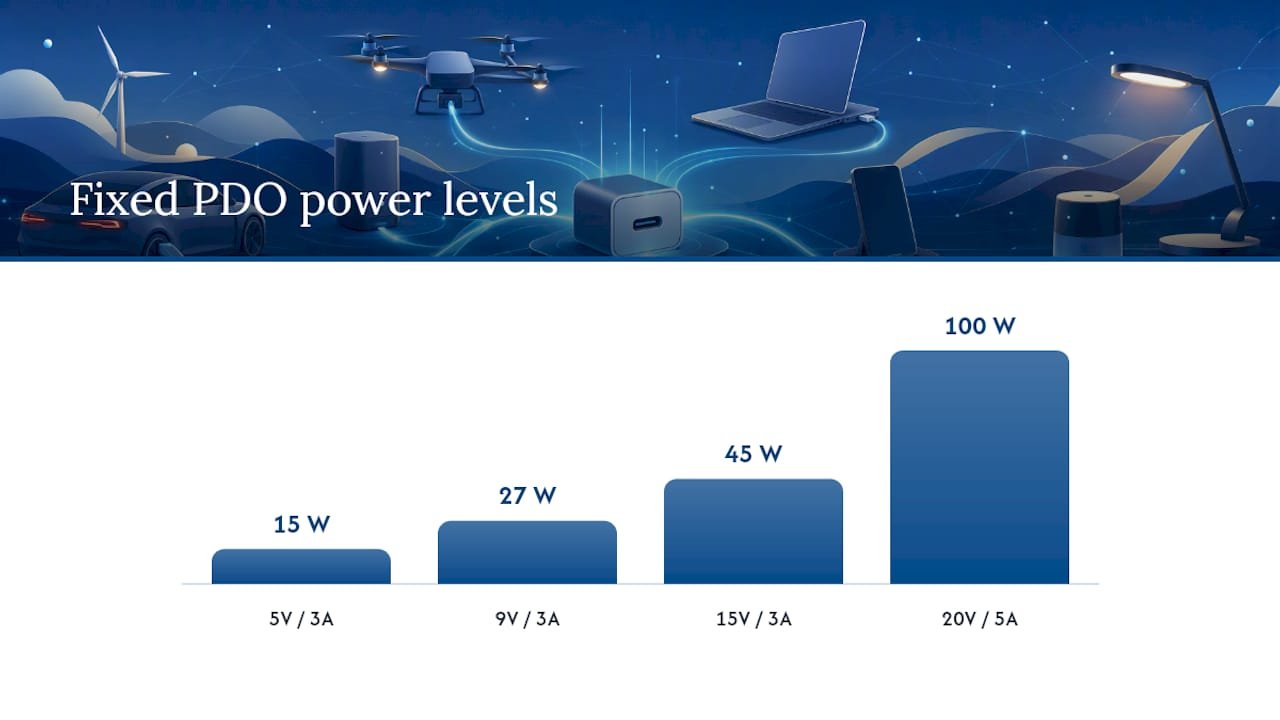
Fixed profiles exist because device categories have predictable appetites. A phone rarely needs more than 20 to 30W, so it negotiates a modest fixed voltage and moves on. A laptop might pull 65W or more, so it climbs higher on the voltage ladder. PPS and APDO entries exist for a different reason: efficiency. Requesting the exact voltage a battery management chip wants, rather than a coarse fixed step, cuts wasted heat during a charge cycle, which is part of why PPS charging has become the default on modern smartphones.
Interoperability depends on one quiet rule: a high wattage source has to behave like a lower rated one when a smaller device asks for less. A 100W charger still needs to safely hand a phone 9V at low current without frying anything, and USB‑IF’s own guidance treats that downward compatibility as a core design requirement, not an afterthought.
A few things worth remembering about how profiles work in practice:
- Fixed PDOs are discrete steps; APDOs (including PPS) are continuous ranges within limits.
- Every PD source must list at least one 5V PDO as a compatibility floor.
- A charger’s total wattage is a ceiling, not a guarantee available on every port at once.
SPR and EPR Voltage and Power Reference
The chart below pairs the legacy PD 1.0 profile numbers with the modern SPR and EPR fixed voltage tiers. This way, you can see how the spec grew from five basic profiles into the current layered system.
| Profile / Tier | Voltage | Max Current | Max Power | Notes |
|---|---|---|---|---|
| Profile 1 (legacy) | 5V | 2A | 10W | Baseline USB PD 1.0 profile |
| Profile 2 (legacy) | 12V | 3A | 10W | Early mid tier option |
| Profile 3 (legacy) | 12V | 3A | 36W | Requires 3A rated cable |
| Profile 4 (legacy) | 20V | 3A | 60W | Requires 3A rated cable |
| Profile 5 (legacy) | 20V | 5A | 100W | Requires 5A e‑marked cable |
| SPR fixed | 5V / 9V / 12V / 15V / 20V | up to 5A | up to 100W | Modern SPR fixed voltage set |
| EPR fixed | 28V | 5A | 100W | Requires EPR capable cable |
| EPR fixed | 36V | 5A | 240W | Requires EPR capable cable |
| EPR fixed | 48V | 5A | 240W | Top of current PD spec |
Anything above the standard 100W SPR range, meaning any EPR row, needs an EPR capable cable, and that requirement is distinct from the older 3A versus 5A rating distinction for SPR cables.
What Makes PPS Different From a Fixed Profile?
PPS occupies the 3.3V to 21V band, and instead of jumping between discrete steps like 9V or 15V, the connected device requests a precise value inside that range, adjusted in small increments as the battery’s charge state changes. That granularity is the whole point. A phone charging on a fixed 9V profile might run measurably warmer than the same phone pulling a PPS negotiated 8.7V, because the fine adjustment avoids the voltage conversion losses that generate heat inside the device.
This matters most for devices that run charging silicon close to its thermal limits, which today means most flagship smartphones and a growing number of tablets. Some practical signs a charger or power bank supports PPS:
- The spec sheet lists a voltage range (like “3.3 to 11V”) rather than a single fixed number.
- Marketing copy mentions “PD3.0 PPS” or references a specific phone brand’s fast charging compatibility.
- The PDO table in the product manual shows an APDO row alongside the fixed entries.
Pro Tip: Don’t assume a higher wattage number means better phone charging. A 65W charger with proper PPS support often charges a PPS compatible phone faster and cooler than a 100W charger that only offers fixed profiles.
How Did USB PD Profiles Evolve Over Time?
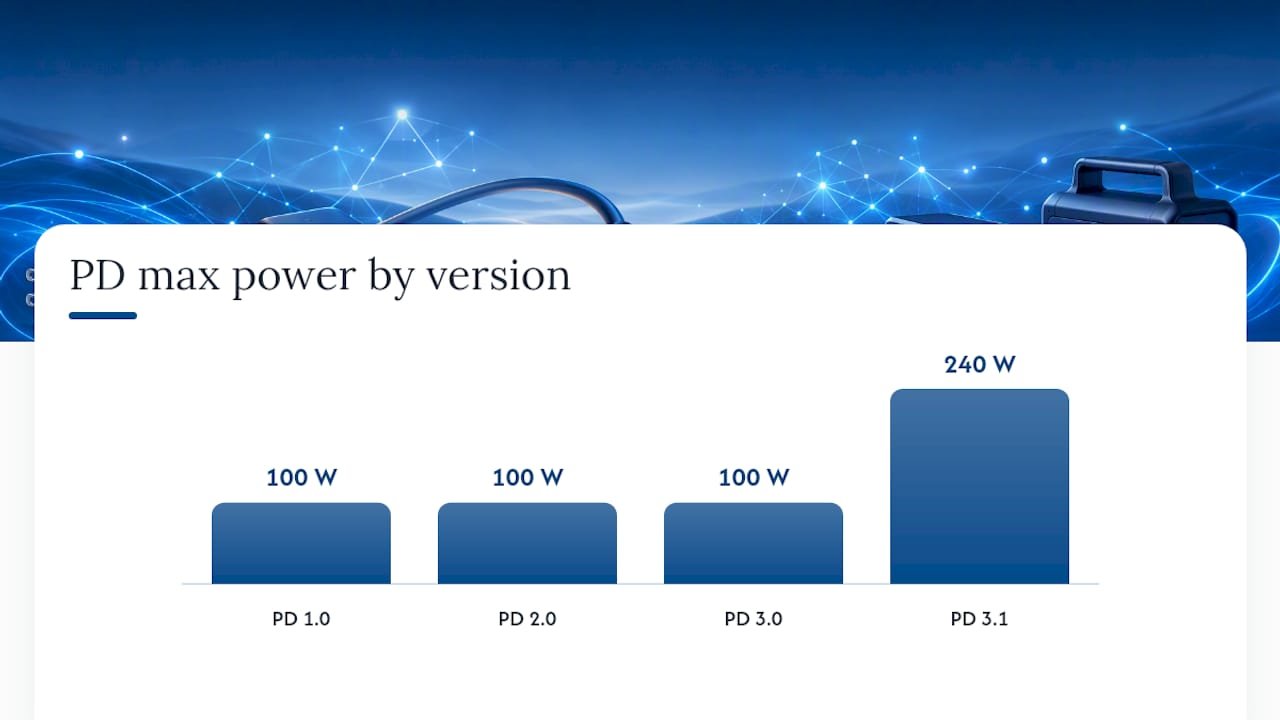
PD 1.0 introduced the five legacy profiles covering 10W up to 100W. PD 2.0 replaced that rigid profile list with CC pin based negotiation, letting sources and sinks build a custom power contract instead of picking from a fixed menu. PD 3.0 added PPS and richer status reporting between devices. PD 3.1 introduced EPR, unlocking the 28V, 36V, and 48V tiers and the 240W ceiling.
A few version specific changes worth knowing:
- PD 2.0 made voltage/current negotiation dynamic rather than menu based.
- PD 3.0 added PPS and battery status messaging for smarter charging behavior.
- PD 3.1 added EPR and revised Type‑C cable requirements to support it.
- Ongoing USB‑IF revisions, including documents up through Revision 3.2, continue refining compliance testing and edge cases.
Each jump kept backward compatibility intact, so an EPR capable charger still negotiates fine with a PD 2.0 device.
How Does a Charger Actually Decide What Power to Send?
The negotiation happens over the CC pins inside the USB‑C connector, which carry the digital handshake separate from the power lines themselves. When you plug in, the source transmits its full PDO table, listing every voltage and current combination it can offer. The connected device reads that table, picks the best match for its own needs, and sends back a request. Once the source acknowledges it, that pairing becomes the active power contract for the session, and Texas Instruments’ technical documentation on the process describes this handshake as the mechanism underlying every PD negotiation regardless of wattage.
Cables matter just as much as the negotiation itself. A basic USB‑C cable is only rated for 3A, capping it around 60W at 20V. Anything above that needs an e‑marked cable rated for 5A, and EPR power levels above 100W require cables built to the newer EPR specification, not just any 5A cable on a store shelf.
Multi‑port chargers add one more wrinkle: the split map. A charger might advertise 100W total, but the split map dictates how that number breaks down when multiple ports are active. A single port might hit 100W alone, then drop to 45W the moment a second device plugs in. That’s not a defect. It’s how the power budget gets divided, and it’s exactly why checking the PDO table and split map matters more than trusting the number printed on the box.
- CC pins carry the negotiation; power pins carry the actual current.
- 3A cables cap SPR power around 60W; 5A e‑marked cables unlock up to 100W SPR.
- EPR power above 100W needs an EPR rated cable, not just a 5A one.
A Practical Checklist Before You Buy or Plug In
- Find your device’s input spec. Check the phone, tablet, or laptop manual for its rated voltage and current, usually printed near the charging port or in settings.
- Read the charger’s PDO table. Most manufacturers publish this in the product manual or a support page, listing every fixed and programmable option available.
- Confirm the cable rating. Match your cable’s amperage rating to what your target power level requires, and use an EPR rated cable for anything above 100W.
- Check the split map for multi‑port use. If you’re charging two or more devices simultaneously, verify how the charger actually divides power once every port is occupied.
- Confirm PPS support if your device benefits from it. Look for an APDO entry in the spec sheet if you own a phone known to support PPS fast charging.
Common pitfalls: assuming headline wattage applies to every port, using an old 3A cable with a high wattage charger, and skipping the manual entirely because the box says “100W fast charging.”
Pro Tip: Always cross-check the vendor’s published split map against your actual use case, especially if you regularly charge a laptop and a phone from the same power bank at once.
What Does This Mean for Ifory’s Power Bank Design?
Some 40,000mAh power banks are built around the practical reality of these profiles rather than a single flashy wattage number. They output up to 100W and manage multiple simultaneous ports, so users charging a laptop and a phone together get real power on both, not a headline number that collapses under multi-device load. An IP67 rating and drop protection matter here too, since outdoor PD gear needs to survive the exact conditions where a dead battery is least convenient.
Cable choice still falls on you: pair a 100W capable power bank with a properly rated cable, or you’re leaving performance on the table regardless of what the PDO table promises…
— Mats
Which Ifory Power Bank Fits Your PD Setup?
If you’re weighing wattage numbers against real PDO tables, the simplest fix is a power bank built around the same SPR and EPR behavior described above. A 100W fast charging power bank is designed for exactly that gap between marketing wattage and delivered wattage, with a 40,000mAh capacity that covers a laptop and a phone stack without hunting for a second outlet.

For anyone charging gear outdoors, a waterproof power bank with LED option adds IP67 protection and a built-in flashlight, useful when you’re setting up camp after dark and still need reliable output for a phone, GPS unit, or camera battery. Both models list their full PDO behavior on the product page rather than a single wattage claim, so you can check port splits before you buy. Browse the full power bank lineup to compare capacity and port configurations against whatever device stack you’re planning to keep charged in the field.
Where to Verify These Specs Yourself
For the primary technical detail behind every claim in this article, go straight to USB‑IF’s PD overview and the official document library, which hosts every spec revision and compliance test suite. Tom’s Hardware’s breakdown of SPR and PPS voltage ranges is a solid plain-language companion to the formal spec documents.