

USB-C Power Delivery (USB-PD) is the protocol that lets a USB-C port and charger negotiate the exact voltage and current before any real power flows, so the same cable can safely trickle 5W into earbuds or push up to 240W into a workstation laptop. The current version, PD 3.1, extended the power ceiling through a mode called Extended Power Range. The practical takeaway: with a compliant charger, cable, and device, you get one universal, self-regulating power standard instead of a drawer full of proprietary bricks.
TL;DR:
- A compliant USB-C charger will only deliver the power level requested through negotiation, preventing overcharging or damage to connected devices.
- PD 3.1 extends maximum power to 240W with new fixed voltages and adjustable voltage support, enabling high-wattage devices like gaming laptops to run off USB-C.
- PPS allows devices to request finely tuned voltages in small steps, reducing heat and improving battery health during fast charging.
- Only eMarked cables rated for over 60W support higher wattage charging, and they include safety features vital for safe, high-power transfer.
- Not all USB-C ports support Power Delivery; verifying device specs or labels is essential to ensure proper charging capabilities.
Table of Contents
- How USB-C PD Negotiation Actually Works
- PD Version History: From 5W Basics to 240W EPR
- What Is PPS and Why Does It Charge Faster and Cooler?
- Do You Need a Special Cable for Higher Wattage?
- Is USB-C the Same Thing as USB-PD?
- How to Choose a PD Charger and Cable Without Overbuying
- Why PD Details Matter for Outdoor Power Banks
- Where USB-C PD Is Headed Next
- Get PD-Ready Power for Wherever You’re Headed
- Sources
How USB-C PD Negotiation Actually Works
PD negotiation is a conversation, not a guess. Every device in a PD connection plays one of two power roles: Source (the thing supplying power, like a charger) or Sink (the thing consuming it, like a phone). Devices that can switch roles depending on what they’re plugged into are called Dual Role Power (DRP) devices, and on the data side, the same connection has a DFP (downstream facing port) and UFP (upstream facing port) relationship that governs which end controls the USB data link.
The actual handshake follows a fixed sequence, and it’s worth knowing by name because it explains why PD rarely goes wrong:
- The Source broadcasts its capabilities as a list of Power Data Objects (PDOs), each one describing a supported voltage and current combination.
- The Sink reviews that list and sends a Request message asking for the specific PDO, or Adjustable PDO (APDO), it actually needs.
- The Source responds with an Accept message confirming the request.
- Once the new voltage is stable, the Source sends PS_Ready, and the Sink can safely start drawing power.
This is why a 100W charger never forces 100W into a phone that only needs 20W. The USB-IF’s technical overview of Power Delivery makes clear that the Sink always drives the request. A compliant charger only offers its menu of PDOs; it never pushes power the device didn’t ask for. Overpowering a sink isn’t a matter of “hoping” the charger behaves. It’s baked into the negotiation logic itself.
Pro Tip: If you’re troubleshooting slow charging, check whether your device is requesting a lower PDO than expected. Some monitoring apps can show you the negotiated voltage and current in real time, which tells you immediately if the cable or port is the bottleneck, not the charger.
PD Version History: From 5W Basics to 240W EPR
PD hasn’t stood still since it launched, and each revision unlocked a new class of device you could realistically charge over USB-C.
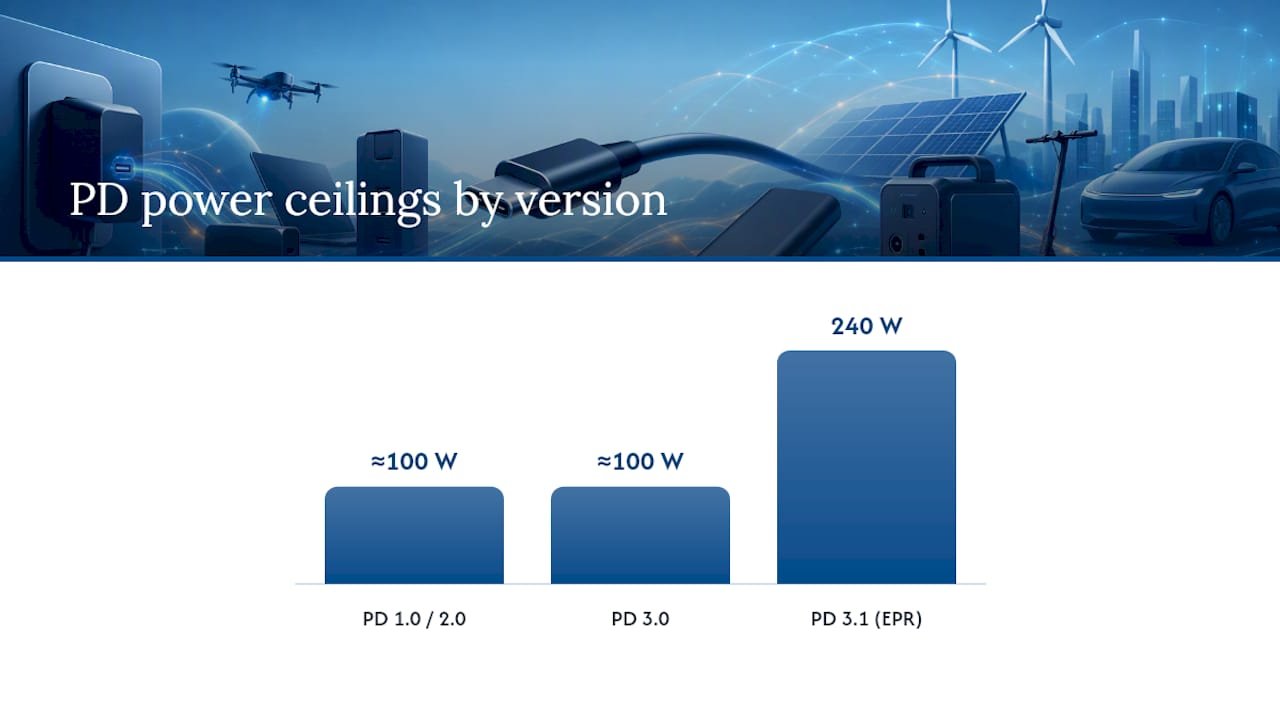
- PD 1.0/2.0 established the core negotiation model, generally capping out around 100W using fixed voltages of 5V, 9V, 15V, and 20V.
- PD 3.0 added Programmable Power Supply and tightened communication reliability without raising the power ceiling.
- PD 3.1 introduced Extended Power Range (EPR), adding fixed voltages of 28V, 36V, and 48V and pushing the maximum to 240W over a full-featured USB-C cable.
That 240W ceiling isn’t just a marketing number. It’s what makes it plausible to run a gaming laptop, a docked workstation, or an external monitor entirely off USB-C, categories that used to require a barrel-jack power supply. PD 3.1 also introduced Adjustable Voltage Supply (AVS), which lets EPR sources fine-tune voltage in smaller steps than the old fixed PDOs allowed, similar in spirit to PPS but operating in the higher EPR power range.
Backward compatibility holds throughout: a PD 3.1 EPR charger will still negotiate correctly with an older PD 2.0 phone, it just won’t offer the higher voltages that phone was never designed to request.
What Is PPS and Why Does It Charge Faster and Cooler?
Programmable Power Supply (PPS), introduced in PD 3.0, changes the negotiation model from picking a fixed voltage off a menu to dialing in an exact one. Instead of jumping between preset steps like 9V or 15V, PPS lets a Sink request voltage in increments as small as 20mV and current in 50mA steps.
- The Sink sends fresh voltage/current requests roughly every one to two seconds to keep the supply tracking the battery’s actual charge curve.
- Finer voltage matching means less energy wasted as heat inside the phone, which is why PPS-charged devices often run noticeably cooler during a fast charge.
- If those periodic requests stop arriving, the Source is required to fall back to a safe default voltage, a built-in safeguard against a stalled or disconnected controller.
Flagship phones use PPS heavily for exactly this reason. Tightening the voltage match reduces thermal stress during the high-current phase of a charge cycle, which is part of why battery health tends to hold up better under PPS charging than under old fixed-voltage fast charging. Some higher-end power banks now support PPS on their input side too, letting them recharge faster from a USB-C wall charger. For a deeper look at the mechanics, see how PPS charging compares to standard PD steps.
Pro Tip: Not every “PD charger” supports PPS. Check the spec sheet for an explicit PPS voltage range (like “3.3V to 21V”) rather than assuming any PD-labeled charger has it.
Do You Need a Special Cable for Higher Wattage?
Not every USB-C cable is built the same, and this is where most real-world PD frustration comes from. A basic USB-C cable is only rated for 60W (3A at 20V). Anything beyond that, including any EPR connection above 100W, requires a full-featured, eMarked cable with a chip embedded in the connector that reports the cable’s exact current and data capabilities to both ends of the connection.
- Check the cable for a 100W or 240W marking on the connector housing or packaging. No marking usually means no eMarker, and no eMarker means the negotiation will cap out at 60W regardless of what your charger can do.
- For any EPR setup above 100W, confirm the cable is rated for 5A and explicitly listed as EPR-compatible, since older 100W eMarked cables weren’t built for the 28V to 48V range.
- Look for the USB-IF certification logo when buying, especially for cables you plan to use with expensive laptops or monitors, since it confirms third-party testing against the official spec.
The eMarker chip isn’t just about wattage reporting. It’s part of the safety chain that supports overcurrent and over-temperature protection throughout the PD stack, working alongside the PS_Ready handshake to make sure power only flows once both ends agree it’s safe.
Pro Tip: A charging cable that “feels warm” under a 100W+ load usually indicates an underspecified cable, not a faulty charger. Swap the cable first before troubleshooting anything else.
Is USB-C the Same Thing as USB-PD?
No, and this is the single most common point of confusion in USB-C shopping. USB-C describes the physical connector shape, the reversible oval port you see on nearly everything now. USB-PD is a separate communication protocol that may or may not run over that connector.
- A USB-C port only supports Power Delivery if it contains dedicated PD controller circuitry; plenty of USB-C ports on cheap accessories are data-only or fixed at 5W.
- Qualcomm’s Quick Charge is a different negotiation protocol entirely, historically built for USB-A but now also implemented over USB-C on some Android devices.
- When both PD and Quick Charge are present, the negotiation itself sorts out which protocol to use, so you generally don’t have to choose manually.
- To check what your device actually supports, look at its spec sheet for “USB-PD” or a wattage rating explicitly tied to Power Delivery, not just “fast charging.”
For a closer comparison of the two ecosystems, PD versus Quick Charge breaks down where each one still shows up in current hardware, and how USB-C differs from USB-A at the connector level.
How to Choose a PD Charger and Cable Without Overbuying
Buying PD gear gets simple once you stop chasing the highest wattage number on the box.
- Match the charger’s power delivery to your device’s actual charging requirement, not its theoretical maximum. A phone that charges at 25W doesn’t benefit from a 140W charger.
- Buy eMarked, USB-IF listed cables for anything over 60W. It’s the cheapest insurance against slow or failed negotiation.
- On multi-port chargers, read whether the wattage is “assured” per port or a “shared” pool across all ports, since plugging in a second device can throttle the first. Ifory’s guide on charging multiple devices walks through how that shared capacity actually splits.
- If a device doesn’t reach its expected wattage, try a different cable first, then a different port, before assuming the charger is defective.
Pro Tip: Keep one dedicated 100W+ eMarked cable just for laptop charging. Mixing it into your general phone-cable rotation is how it ends up lost or swapped for a 60W cable at the worst moment.
Why PD Details Matter for Outdoor Power Banks
Everything above matters more, not less, once power comes from a battery instead of a wall outlet. A power bank’s PD output determines whether it can actually run a laptop instead of just topping off a phone, and PPS support on its input side determines how fast it recharges before your next trip.
- A 100W PD output is the practical threshold for charging most productivity laptops directly from a power bank rather than just phones and tablets.
- Correct eMarked cables matter even more outdoors, where a cheap cable failing at full load is harder to diagnose in the field than at a desk.
- A 40,000mAh power bank pairs 100W PD output with an IP67 rating and solar panel compatibility, so charging capability doesn’t stop at the trailhead.
For setups that lean on solar input, a PD-compatible 40W solar panel keeps the same negotiation logic working end to end, from panel to bank to device.
Where USB-C PD Is Headed Next
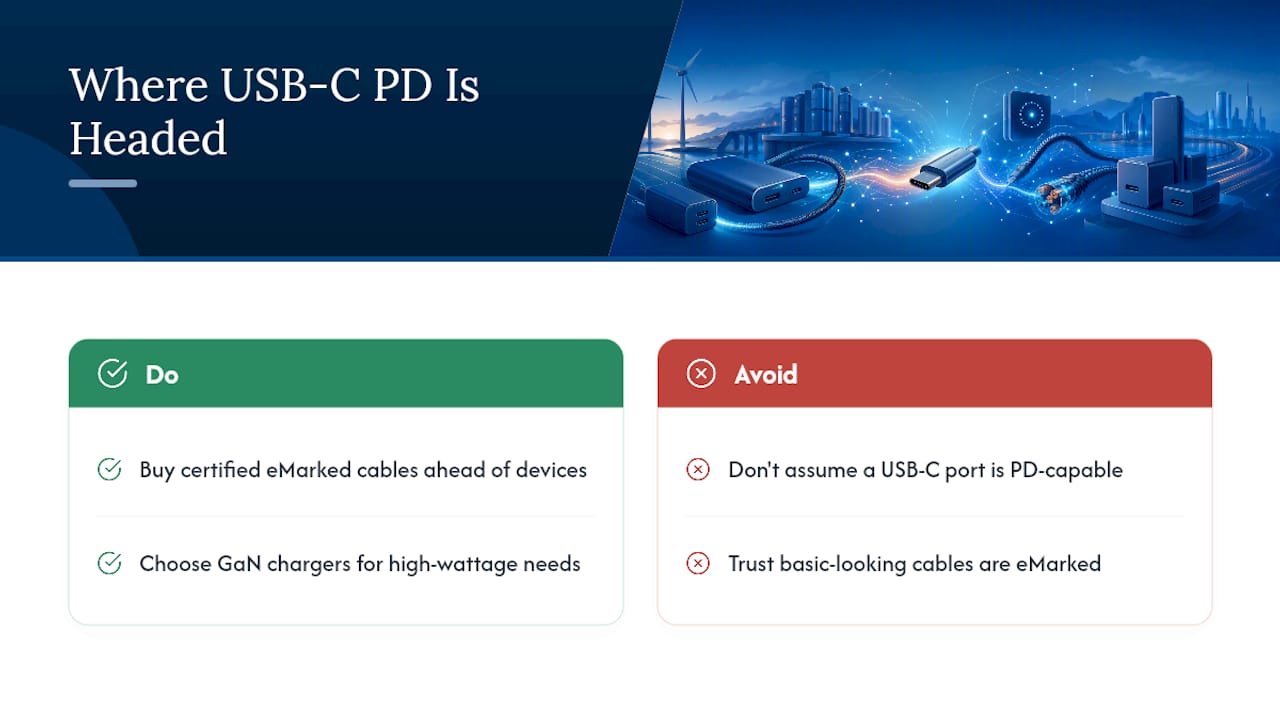
GaN chargers keep shrinking the size penalty for higher wattage, and EPR adoption will spread gradually as more laptops and monitors ship with 100W plus PD controllers built in. Standardization is genuinely reducing charger clutter, but cable confusion won’t disappear on its own. Too many basic cables still look identical to eMarked ones.
My practical advice for anyone building a charging setup now: buy certified eMarked cables ahead of the devices that will need them, and don’t assume a USB-C port is PD-capable just because it looks like one.
— Mats
Get PD-Ready Power for Wherever You’re Headed
Everything covered here, PDOs, PPS, EPR, eMarked cables, exists to answer one question: will your gear actually charge when you need it? This power bank lineup answers that with 100W PD output, multiport charging, and an IP67 rating built for conditions a desk charger never has to survive.

That 100W output is enough to top off a laptop mid-trip, not just squeeze another 20% into a phone, and the 40,000mAh capacity means you’re not rationing power on a multi-day trip. Pair it with a compatible solar panel and the same PD negotiation that governs your wall charger keeps working off-grid. If you’re ready to stop worrying about dead batteries in remote spots, check out a current power bank lineup and match a model to your trip.