

For most single-laptop owners, a 65W charger hits the right balance of speed, size, and price. If you charge a 14 or 16 inch pro laptop, juggle a phone and tablet at once, or want one brick that handles whatever you buy next, get 100W instead. The one rule to remember: 100W chargers can safely power 65W devices, but a 65W charger will bottleneck anything that wants more than 65W.
TL;DR:
- A 65W charger is sufficient for most ultrabooks and phones, but higher-demand laptops, especially 14 to 16 inch models, benefit significantly from 100W power.
- Using a charger beyond your device’s rated wattage offers no speed advantage for phones or tablets, which rarely exceed 45W, making 65W adequate for these.
- Chargers supporting PD 3.1 EPR up to 140W are required for high-end gaming and large pro laptops that draw well above 100W, as lower-wattage chargers will only trickle charge these devices.
- Multi-port chargers often split power based on a preset table, so assessing your device power needs and verifying port splits are essential before purchase.
- Proper cables rated for 5A and equipped with an E-Marker chip are crucial to achieving true 100W charging speeds, as most budget cables cap at roughly 60W.
Table of Contents
- Quick Decision Guide: 65W or 100W in Seconds
- What a Watt Means, and PD 3.0 vs PD 3.1 Explained
- Which Charger Tier Fits Your Devices?
- How Multi-Port Chargers Split Power Between Devices
- Why Cables and Negotiation Bottleneck Real Charging
- Size, Heat, and Price: The Real Tradeoffs
- How to Choose: Checklist and Verification Steps
- What I Carry, and Why
- Ifory: A 100W Power Bank for When There’s No Outlet
- Sources
Quick Decision Guide: 65W or 100W in Seconds
Match the charger to your heaviest device, not your average one. A single 13 inch ultrabook or phone user rarely needs more than 65W. Anyone charging a 14 to 16 inch performance laptop, or two to three devices at once, should size up.
Before buying, confirm three things: your device’s rated wattage (check the OEM adapter or settings menu), whether it supports USB Power Delivery 3.0 or the newer 3.1 EPR tier, and how the charger splits power across ports when more than one device is plugged in.
- One device, under 65W draw: a 65W GaN charger covers it with room to spare.
- One 14 to 16 inch pro laptop: go 100W, because anything less throttles charging under load.
- Phone plus tablet plus laptop, simultaneously: 100W with a documented per-port split table.
- Budget and pocket space matter most: 65W wins on price and size for light use.
Add roughly 20 to 30W of headroom to your total device draw before you land on a wattage tier. Undersizing is the most common mistake.
What a Watt Means, and PD 3.0 vs PD 3.1 Explained
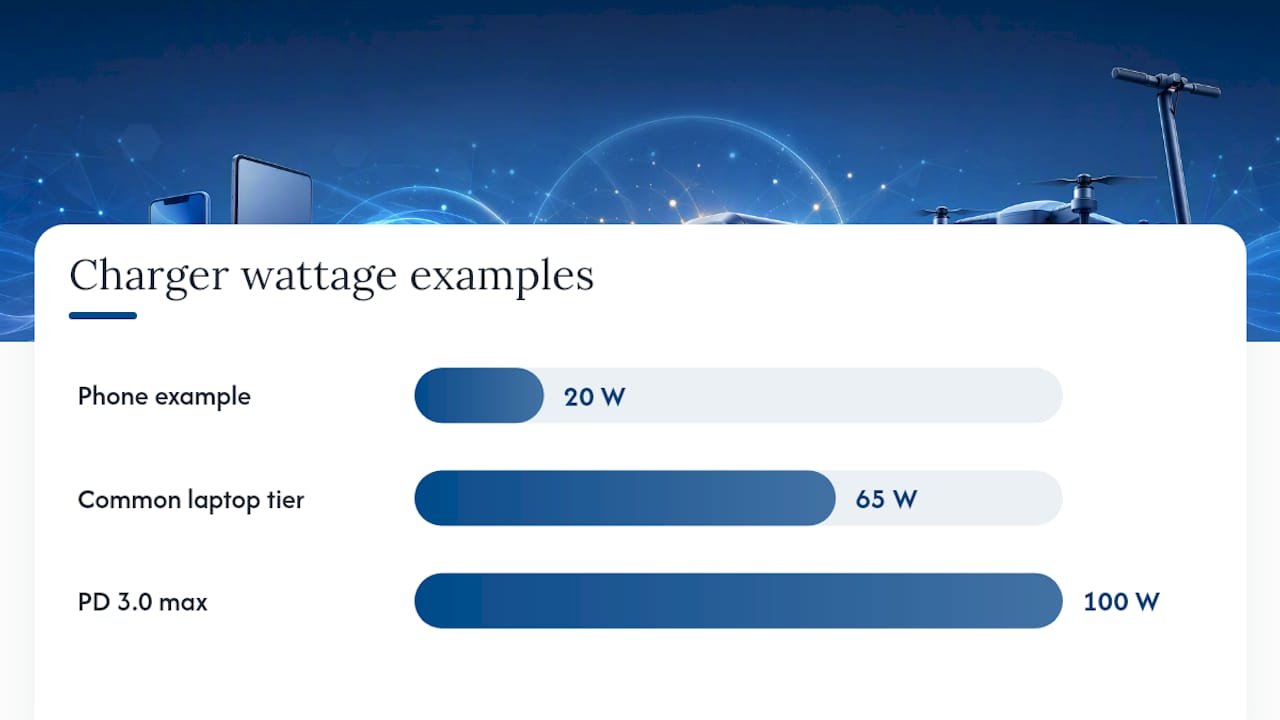
A watt is simply volts multiplied by amps. That equation is why USB-C chargers list output as pairs like 20V at 3.25A: the charger and device negotiate voltage and current together, then settle on a wattage both can handle. This negotiation runs on USB Power Delivery, the standard that lets a single USB-C port push far more energy than the old 5W USB-A spec ever could.
PD 3.0 tops out at 100W, achieved at 20V and 5A. Push past 100W and you enter PD 3.1’s Extended Power Range, which adds higher voltage tiers up to 48V and requires both the charger and cable to support EPR signaling.
- PD 3.0: covers the 65W and 100W tiers most laptops and tablets use today.
- PD 3.1 EPR: required for anything above 100W, including some gaming laptop chargers.
- Negotiation matters: a device only pulls what it asks for, so a 100W brick never overpowers a 20W phone.
Which Charger Tier Fits Your Devices?
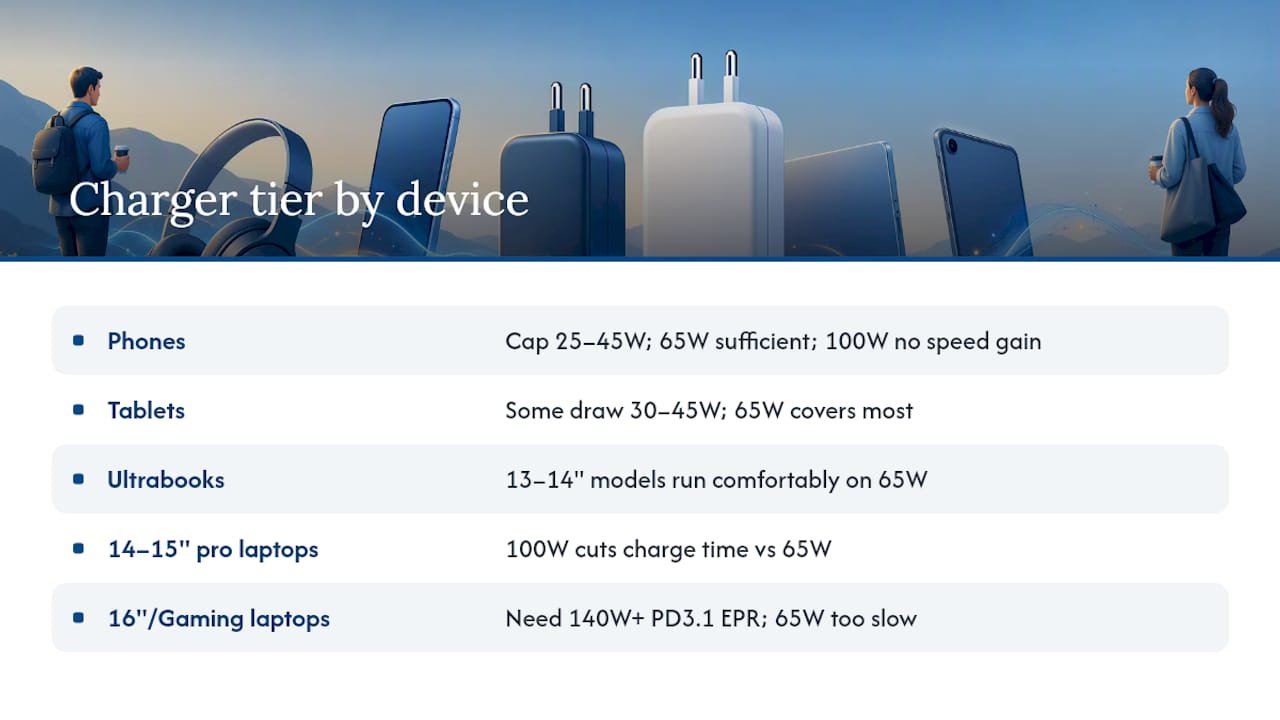
Phones rarely benefit from anything above their own ceiling. Most flagship phones cap between 25W and 45W, so pairing one with a 100W charger buys nothing beyond convenience. Tablets vary more: some iPad Pro and Android tablet models can pull 30 to 45W, still comfortably inside 65W territory. Testing shows chargers above a device’s negotiated limit yield no speed gain for phones specifically, so buying up for phone speed alone is money wasted.
Ultrabooks and most 13 to 14 inch laptops run comfortably on 65W, since their batteries and processors are tuned for that ceiling. Step up to a 14 or 15 inch pro machine, and the math changes.
In real charging tests, a 100W charger cut charging time significantly versus 65W on higher-demand laptops, largely because a 65W brick may start near its rated output but fall off as the laptop’s battery management throttles input. A 100W charger sustains a higher average wattage through the whole charging curve instead of tapering early.
Sixteen inch pro laptops and high-wattage gaming laptops are where things get tricky: several draw well above 100W under load, meaning even a 100W charger will only trickle-charge them while running demanding tasks. Those machines need PD 3.1 EPR chargers rated for 140W or higher, and a 65W brick will feel noticeably slow.
How Multi-Port Chargers Split Power Between Devices
A 100W charger with three ports rarely gives every port 100W simultaneously. Manufacturers publish a split table, often buried in a spec sheet or FAQ page, showing how total wattage divides: a common layout is 65W plus 30W on two USB-C ports, or a three-way split like 60W, 30W, and 7.5W depending on what’s plugged in and where.
Before buying a multi-port brick for charging several devices at once, add up what each device actually needs and build in headroom.
- Laptop drawing 65W plus a phone drawing 20W means you need at least 85W of real capacity, not exactly 85W on paper.
- Check whether plugging in a second device automatically drops the first port’s output, since many chargers reduce the primary port the moment a second load appears.
- Look for the split table on the product listing or in the included manual before assuming every port runs at full rated wattage together.
Why Cables and Negotiation Bottleneck Real Charging
The charger is only half the equation. A 100W-capable cable needs an E-Marker chip and a 5A rating; without it, the charger and device negotiate down to a safe lower wattage automatically. Most bundled or budget USB-C cables are rated for 3A, which caps any connection at roughly 60W no matter how capable the brick is.
Cable specs are also the single most common reason people report lower charging speeds than the box promised, ahead of charger quality or device firmware issues. Device firmware and thermal management add another layer, throttling wattage as a battery fills or a laptop runs hot.
- Confirm the cable lists “5A” or “100W” on the packaging, not just “USB-C.”
- Use a USB power meter to read real-time wattage under an actual workload, not just at plug-in.
- Test with the laptop or tablet doing real work, since idle charging numbers rarely match sustained-load numbers.
Pro Tip: Keep one certified 5A E-Marker cable dedicated to your highest-wattage device. Swapping in whatever cable is nearest is the number one reason people think their new charger is defective.
Size, Heat, and Price: The Real Tradeoffs
GaN chargers deliver the same wattage in a notably smaller package than older silicon designs, often 40 to 50% smaller, and they run cooler under sustained load. That efficiency comes at a modest price premium over basic silicon bricks.
A 100W brick, even in GaN form, is still physically larger than a 65W GaN charger and tends to run warmer when pushing near its ceiling for extended periods.
- If you travel light and charge one device, a 65W GaN charger is usually the better balance of size and speed.
- If you need one charger to cover a laptop, phone, and tablet reliably, the extra bulk of 100W pays for itself.
- Price gaps between 65W and 100W GaN models have narrowed enough that wattage, not cost, should drive the decision for most buyers.
How to Choose: Checklist and Verification Steps
- Check your device’s rated wattage on the original adapter label or in its power settings menu.
- Confirm the PD version your device supports, since PD 3.1 EPR devices need a charger and cable built for it.
- Find the per-port split table on multi-port chargers before assuming full simultaneous output.
- Verify the cable is rated 5A with an E-Marker chip if you’re aiming for true 100W.
- Run a load test: charge one device at a time first, then add a second and watch for output drops.
- Check surface temperature after 30 minutes under load; excessive heat often signals an underrated internal design.
Ask any seller directly for the port-by-port wattage split and the cable included in the box. If they can’t answer, assume the worst case and plan accordingly. For laptops nearing end of life, it’s also worth weighing a battery health or repair checklist against buying a bigger charger.
What I Carry, and Why
I travel with a 100W setup, not because my laptop needs it daily, but because one bad hotel outlet or a dead phone mid-hike changes the math fast. A power bank rated for 100W input and output does what no wall charger can: it charges when there’s no wall at all. For the technical backbone behind these numbers, the PD versus Quick Charge breakdown is worth a read.
— Mats
Ifory: A 100W Power Bank for When There’s No Outlet
Everything above assumes you’re near a wall. Off-grid, on a boat, or three days into a trail, the charger conversation changes entirely, and that’s where a high-capacity power bank earns its place in your bag. Ifory’s 100W fast-charging power bank packs 40,000mAh into a body built for exactly that gap, giving you enough capacity to top off a 16 inch laptop and a phone without hunting for an outlet.

It carries an IP67 waterproof rating and an anti-drop structure, so a splash on the kayak or a drop on the trail doesn’t end your trip early. Multiple ports let you split power the same way a wall charger does, a real-time LED display shows exactly how much runtime you have left, and a built-in 500-lumen flashlight covers you if the sun goes down before camp does. Check the Ifory power bank lineup to find the capacity that matches your next trip.
Sources
For the standards and test data behind the claims above: TechTarget’s watt definition verifies the volts times amps basics. Byber App’s charger buying guide confirms PD 3.0 versus PD 3.1 EPR specifics and GaN efficiency gains. ChargingGearLab’s wattage comparison supplies the real-world charge-time testing. ChargeTechLab’s cable guide confirms the E-Marker and 5A cable requirement for true 100W delivery.
- USB-C Power Delivery Wattage Chart: 65W vs 100W vs 140W Compared – ChargingGearLab
- USB-C charger buying guide: wattage, GaN, and Power Delivery explained | Byber App
- 65W vs 100W vs 140W USB-C Charger: Guide | ChargeTechLab