
Size your gear to actual watt-hours, not guesswork: figure out how much power your speaker and devices burn, bring a battery bank sized to that number plus a buffer, and add a solar panel or car charger for anything past two nights. That’s the whole plan. Huawei’s storage research recommends keeping lithium batteries between 40% and 60% charge in storage, and general consumer battery-safety guidance applies the same caution to any lithium pack you’re hauling into the backcountry: keep it dry, keep it out of direct heat, and don’t charge it on something flammable.
Before you pack, know these three things:
- Your speaker’s watt-hour need (check the mAh rating on the box or manual)
- One primary power source sized to cover it, like the Ifory 40,000mAh 100W power bank
- A backup: a second bank or a small solar panel for trips longer than a couple of nights
Pro Tip: Write your speaker’s mAh rating on a piece of tape and stick it to the speaker itself. You will forget it by day two, and searching for the manual at a campsite with no signal is its own kind of misery.
Key Takeaways
| Point | Details |
|---|---|
| Calculate before you pack | Convert your speaker and device mAh ratings to watt-hours using (mAh × 3.7) / 1000. |
| Build in a buffer | Add 20 to 30% extra capacity to your total to cover cloudy days and conversion losses. |
| Match gear to trip length | Use a single bank for one night, a high-capacity bank for two to three nights, and add solar past that. |
| Store batteries at 40 to 60% | Keep lithium packs partially charged and away from extreme heat or cold when not in use. |
| Choose a rugged, high-capacity bank | The Ifory 40,000mAh 100W power bank delivers roughly 148 Wh with IP67 protection for multi-day trips. |
Table of Contents
- How Much Power Does Your Bluetooth Speaker Actually Need While Camping?
- Which Portable Power Setup Should You Bring by Trip Length?
- How Do You Keep Camping Batteries Safe in the Outdoors?
- How Do You Charge Multiple Devices Without Draining Everything at Once?
- What Should Be on Your Campsite Charging Checklist?
- Get a Power Bank That’s Actually Built for Camp, Not Just Your Desk
- Frequently Asked Questions
- Sources
How Much Power Does Your Bluetooth Speaker Actually Need While Camping?
You don’t need an engineering degree for this, just one formula: Wh = (mAh × 3.7) / 1000. That converts your device’s battery rating (in milliamp-hours) into watt-hours, the unit that actually tells you how much energy you’re working with. CampChap’s camping electronics guide recommends this exact conversion as the first step before buying any battery bank, and it’s the difference between guessing and actually planning.
Here’s how that plays out with real gear. A small clip-on speaker with a 1,350mAh battery works out to about 5 Wh. A mid-size speaker around 2,700mAh lands near 10 Wh. A big party speaker with an 8,000mAh cell runs closer to 30 Wh. Your phone, at a typical 3,500mAh, needs roughly 13 Wh for a full charge.
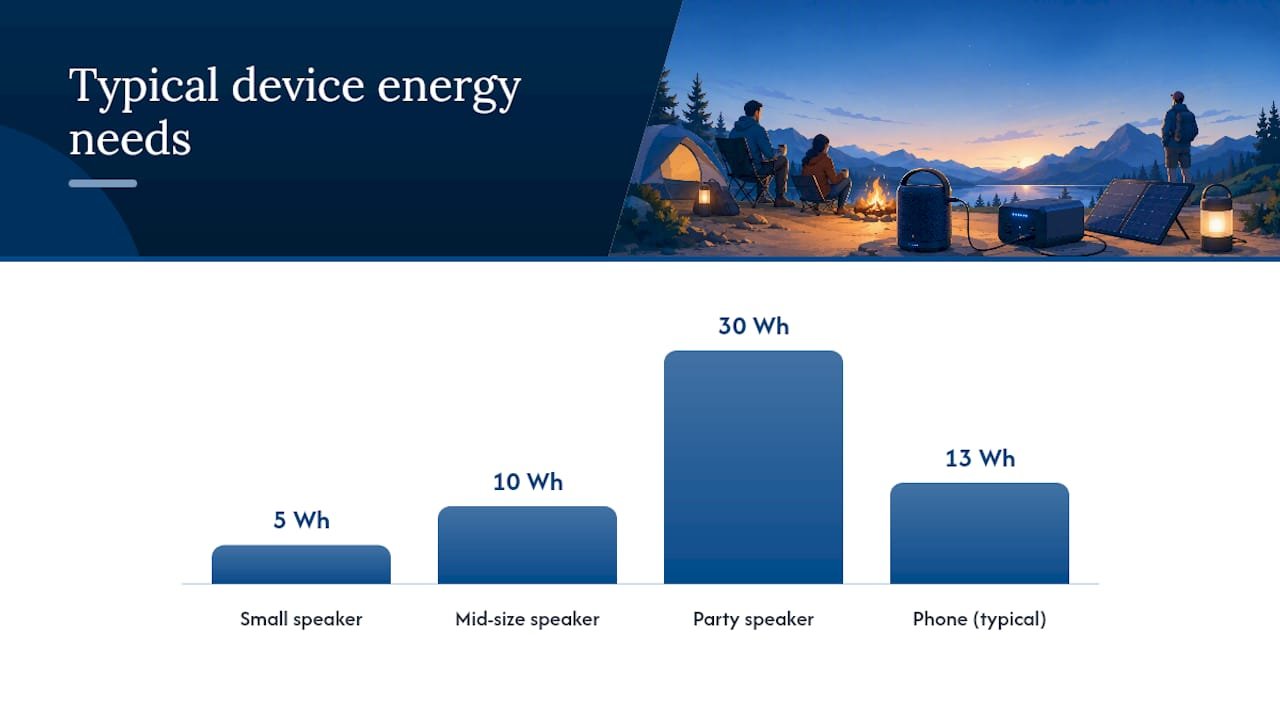
Now stack that against the Ifory bank’s 40,000mAh rating, which converts to about 148 Wh on paper. That’s still enough to fully recharge a mid-size speaker more than 12 times, or top off your phone nearly 10 times, on a single charge of the bank itself.
To plan a trip:
- Add up the Wh for every device you’re bringing.
- Multiply the total by 1.25 to 1.3 to build in a 20 to 30% buffer, since CampChap’s guidance treats that margin as standard practice for cloudy days and battery inefficiency.
- Multiply by the number of nights you’ll be off-grid before your next real recharge opportunity.
Pro Tip: Don’t just plan for the speaker. Add up your headlamp, phone, camera, and anything else pulling from the same bank. The speaker is rarely the biggest drain, it’s just the one people forget to count.
Which Portable Power Setup Should You Bring by Trip Length?
The right setup depends entirely on how many nights you’ll spend without access to a wall outlet. Overthinking this for a one-night trip wastes pack space; underthinking it for a five-day trip leaves you with a dead speaker on day three.
Short trips (one night): A single compact power bank in the 10,000 to 20,000mAh range usually covers a speaker, a phone, and maybe a headlamp. You don’t need ruggedness specs here so much as simplicity: one USB-C port, one cable, done.
Multi-night trips (two to three nights): This is where a high-capacity bank earns its weight. BackupPowerHub’s charging guide notes that a station in the 256 to 288Wh range typically covers a three-night trip with a mixed device load, which lines up closely with what the Ifory 40,000mAh bank delivers on its own. The advantage of a single high-capacity bank over a bulkier power station is packability: you get comparable output without the extra weight and footprint.
Extended trips (three-plus days): Pair your bank with a portable solar panel or plan a car top-up. A 40W panel like Ifory’s PD 40W solar panel adds roughly 80 to 100 Wh over four to five hours of decent sun, according to BackupPowerHub’s field data, enough to offset a full day of speaker and phone use.
Prioritize USB-C PD ports for anything with a fast-charging phone or laptop; USB-A still works fine for headlamps, cameras, and older accessories. One caveat on pass-through charging (running the bank off solar while it simultaneously charges your speaker): it works, but it’s slower than charging the bank first, then the device. If you’re not in a rush, do it. If your speaker’s nearly dead and the sun’s about to set, charge the bank alone first.
- Pro: single high-capacity bank means fewer parts to lose or forget
- Pro: solar adds real recharge capacity without needing a car
- Con: solar yield drops fast under tree cover or overcast skies
- Con: power stations are more capable but add real pack weight
How Do You Keep Camping Batteries Safe in the Outdoors?
Huawei’s battery storage guidance points to that range specifically because storing a lithium cell fully charged or fully drained accelerates aging and raises safety risk. That guidance matters more on a week-long trip than a weekend one, since your bank sits idle between charging sessions more often.
Storage guidance: Huawei recommends 40 to 60% state of charge and a temperature range of roughly 15 to 25°C for lithium batteries in storage, with controlled humidity to prevent condensation buildup.
Cold weather is the sneakier problem. Below freezing, a lithium battery’s usable capacity drops, and some banks will refuse to charge until they warm back up. Research on outdoor battery installations confirms that cold temperatures reduce usable capacity and can restrict charging entirely until the cell reaches a safe operating range. The fix is low-tech: sleep with your bank in your sleeping bag or jacket, not in an outer pocket exposed to the night air.
Run through this checklist at every campsite:
- Charge in a ventilated spot, never inside a sealed tent overnight
- Never charge a bank or speaker directly on bedding or fabric
- Keep charging ports dry; a damp USB port is a common cause of failed charging
- If running a 12V car setup, use an in-line fuse
- Skip unfamiliar public USB charging stations at trailheads or rest stops, since CISA’s guidance on public charging security flags unknown USB ports as a potential data and device risk
How Do You Charge Multiple Devices Without Draining Everything at Once?
Charge in order of priority: safety and communication devices first (GPS, headlamp, phone for emergencies), then shared essentials, then discretionary gear like your speaker. That order keeps you covered if your bank runs low before everything’s topped off.
- Set one daily charging window, ideally midday when solar input (if you have it) peaks.
- Charge navigation and communication devices first.
- Move to phones and cameras next.
- Charge the speaker last, since it’s rarely mission-critical.
- Check your bank’s remaining charge on its display before starting the next device.
Fort Robin’s power station guidance recommends charging one device at a time rather than running every port simultaneously, since BackupPowerHub notes that multi-port charging can introduce 5 to 10% efficiency losses from added heat. Stick to USB-C or USB-A directly whenever you can, and skip AC inverters unless a device truly requires a wall plug. Inverters add another conversion step, which means another slice of lost power.
Pro Tip: Carry short, high-quality cables and label each one with a strip of colored tape. At a dark campsite fumbling through a dry bag, telling USB-C from USB-A by feel alone wastes more time than you’d think.
What Should Be on Your Campsite Charging Checklist?
Pack these before you leave the driveway, not after you’re already at the trailhead:
- Primary power bank (sized to your calculated Wh total)
- Backup bank or solar panel for trips over two nights
- Short USB-C and USB-A cables, at least one spare of each
- In-line fuse if running any 12V car setup
- Waterproof pouch for the bank itself
- Insulating sleeve or wrap for cold-weather trips
- A dry, ventilated bag specifically for charging gear
At camp: pick a shaded but ventilated spot for the bank itself, set a solar panel in direct sun away from tree cover, place everything on a non-flammable surface, and run your charging window at the same time each day so it becomes routine.
- If the speaker isn’t charging, check the cable first, then try a different port.
- If solar output seems low, reposition the panel and angle it more directly at the sun before assuming it’s broken.
Field note: what actually works overnight in the cold
Keeping the bank inside my jacket overnight preserved noticeably more charge than leaving it in an outer pack pocket exposed to near-freezing air. Solar output under partial tree cover also ran well below the panel’s rated output, closer to half than I expected. One habit that helped more than any gear choice: taping a small cable organizer inside the tent vestibule kept devices charging under cover but still ventilated, instead of tangled in a dry bag I had to dig through every morning.

Get a Power Bank That’s Actually Built for Camp, Not Just Your Desk
Most power banks are designed for a commute, not a rainstorm at 2 a.m. or a drop onto granite. The Ifory 40,000mAh 100W power bank is built around the numbers this article just walked through: at roughly 148 Wh on paper, it covers 12 or more mid-size speaker charges, or close to a week of phone and headlamp use, on a single charge.
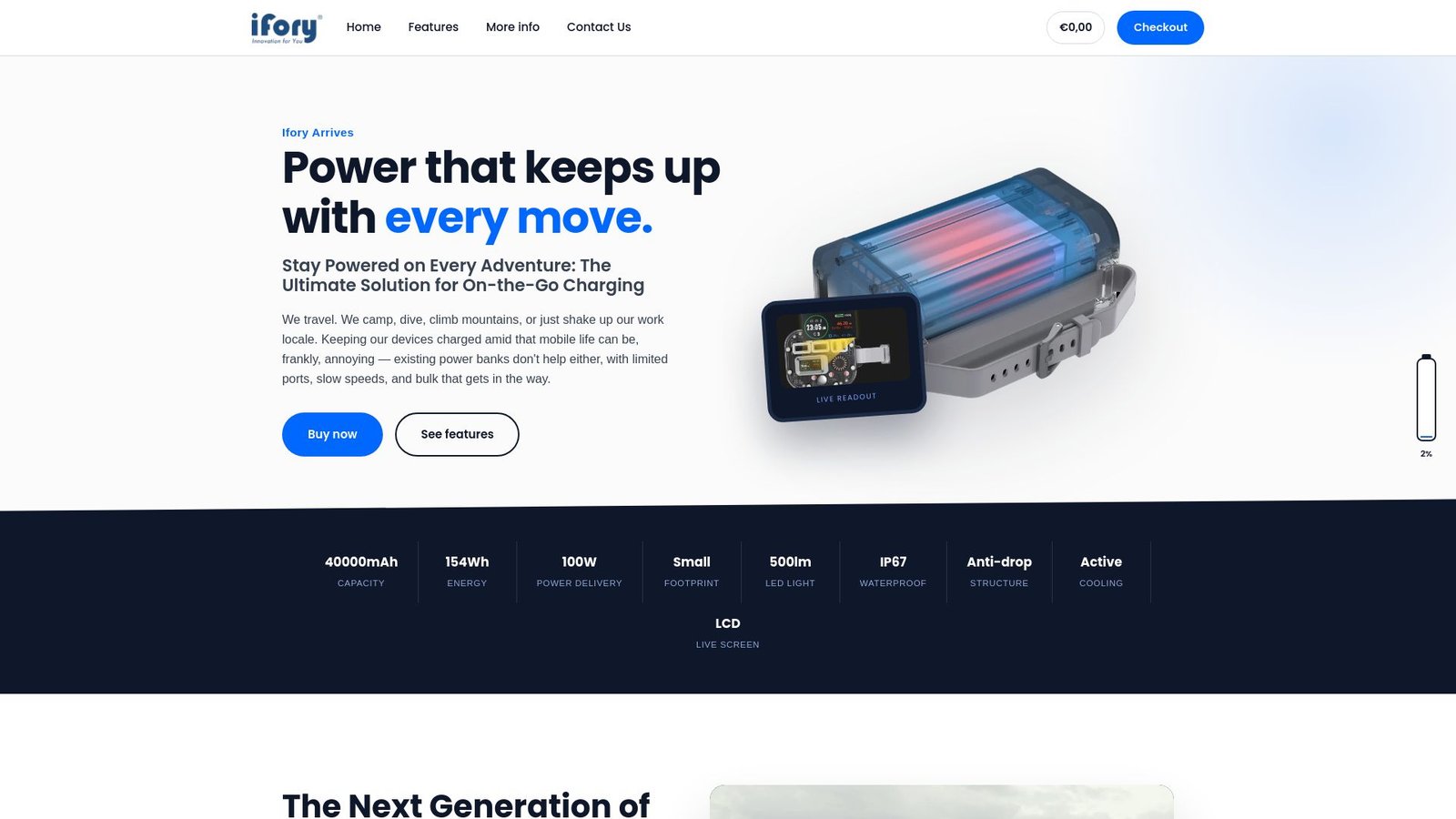
It carries an IP67 waterproof rating for creek crossings and surprise downpours, an anti-drop structure for rockier campsites, and a real-time LCD display so you’re not guessing how much runtime is left before your speaker dies mid-song. USB-C PD support means fast charging for your phone or laptop alongside the speaker, and the built-in flashlight covers you if your headlamp batteries give out first. For trips past three nights, pair it with the 40W portable solar panel for a steady daytime top-up. Check current stock and specs on the Ifory power bank category page before your next trip.
Frequently Asked Questions
How do you charge a Bluetooth speaker while camping with no outlet nearby?
Bring a power bank sized to your speaker’s watt-hour rating, calculated from its mAh spec. For most mid-size speakers, a bank in the 20,000 to 40,000mAh range covers several full charges without needing an outlet at all.
Can a solar panel charge a Bluetooth speaker directly?
It’s better to charge a battery bank with the solar panel, then charge the speaker from the bank. Direct sun-to-device charging is inconsistent because output varies with cloud cover and panel angle, per BackupPowerHub’s field notes.
How many times can a 40,000mAh power bank charge a Bluetooth speaker?
At roughly 148 Wh of usable output, a 40,000mAh bank like Ifory’s can recharge a mid-size 10 Wh speaker more than 12 times, or a larger 30 Wh speaker around 4 times, before it needs its own recharge.
Is it safe to charge devices in cold or wet camping conditions?
Cold temperatures reduce a battery’s usable capacity and can pause charging until it warms up, so keep banks insulated overnight. Always charge in a ventilated spot and keep ports dry, since a wet USB port is a common cause of failed charging outdoors.
What’s the best way to charge multiple devices without draining the bank too fast?
Charge one device at a time rather than running every port simultaneously, since multi-port use adds heat and efficiency losses. Prioritize safety devices like GPS and phones first, then charge speakers and other discretionary gear last.
Sources
- How to store lithium-ion batteries
- How Do I Keep Electronics Charged While Camping? 10 Proven Tips
- Charging Electronics While Camping: 2026 Guide