

Max output is a ceiling, not a guarantee: it’s the highest wattage a power bank can push under ideal conditions, usually from a single port. What your phone, tablet, or laptop actually receives depends on device negotiation, cable quality, and heat. The practical fix is simple: stop reading only the headline watt number and check the per-port rating against your device’s actual charging limit.
TL;DR:
- The actual power your device receives depends on negotiation, cable quality, and heat, not just the power bank’s maximum wattage rating.
- Multi-port banks divide available wattage among devices, so sharing ports reduces charging speed below the maximum per-port output.
- High-wattage power banks generate more heat, which can cause thermal throttling and accelerate battery degradation if not managed properly.
- Devices like phones, tablets, and laptops have different useful wattage ranges, so choosing a bank with the right per-port wattage for your main device is essential.
- Always verify that cables are certified for your power bank’s wattage and check the power bank’s input rating to ensure fast recharging times.
Table of Contents
- What Does “Max Output” Mean in Watts, Volts, and Amps?
- Why the Advertised Max Output Isn’t What Your Device Receives
- How Does Max Output Change Charging Speed by Device?
- How Do You Choose a Power Bank Based on Max Output?
- Applied Example: What Ifory’s Specs Mean for Real Use
- What Safety Features Protect Against Max Output Risks?
- Does High Max Output Shorten Battery Life?
- How Does Battery Technology Affect Compatible Max Output?
- Which Fast Charging Standards Actually Determine Max Output?
- What I’d Tell a Friend Buying Their First High-Wattage Power Bank
- Get a Power Bank Built for Real Max Output, Not Just the Label
- Sources
What Does “Max Output” Mean in Watts, Volts, and Amps?
Every power bank spec sheet reduces to one formula: watts equal volts multiplied by amps (W = V × A). A port rated at 5V and 2A delivers 10W. A port rated at 20V and 5A delivers 100W, which is the math behind that “20V 5A power bank” label you’ll see stamped on higher-end units. Same formula, wildly different results depending on the voltage the device and bank agree on.
Spec sheets usually show one of two things, and confusing them causes most of the buyer’s remorse in this category:
- Per-port output: the max wattage available from a single USB-C or USB-A port when it’s the only thing plugged in.
- Total or combined output: the ceiling across all ports running at once, which is almost always lower than adding up every port’s individual max.
- Input rating: how much power the bank itself can accept while recharging, separate from what it sends out.
That last figure matters more than most buyers realize. A bank with a weak input rating can take six hours or more to refill even if it blasts 100W out the other side. Matching a charger and cable to the bank’s actual input spec can cut an 80% recharge from six-plus hours down to under two.
Why the Advertised Max Output Isn’t What Your Device Receives
Advertised watts describe a best-case scenario. Real charging power gets whittled down by three things happening at once, and understanding them explains almost every “why is this charging so slowly” complaint online.
- Power Delivery negotiation. USB PD isn’t a fixed voltage. The bank and device handshake and agree on a voltage/current pair from a menu of options, so a phone might negotiate 9V/2A while a laptop negotiates 20V/3.25A from the same port.
- Port-sharing on multi-port banks. Plug one cable into a 65W bank and you might get the full 65W. Plug in two devices, and testing on similar multi-port units shows the total output gets divided between them, sometimes cutting each port to a fraction of its solo rating.
- Cable and thermal limits. A cheap cable rated for 3A won’t carry a 5A negotiation no matter what the ports support, and heat buildup during long sessions forces the internal circuitry to throttle back rather than risk damage.
Manufacturers also note that a compatible PD cable and a device that actually accepts that profile are prerequisites, not details. Skip either one and the device just draws less, silently, with no error message telling you why.
Pro Tip: Keep the power bank out of direct sun and off hot car dashboards during a charge session. Sustained heat is one of the fastest ways to trigger thermal throttling, and it happens well before the bank feels “hot” to the touch.
How Does Max Output Change Charging Speed by Device?
Wattage needs scale by device category, and pushing more watts at a device than it can use buys you nothing.
- Phones: typically useful in the 10–30W range. Most phones cap their fast-charge profile well below 30W regardless of what the bank offers.
- Tablets: usually land in the 18–45W band, with larger tablets pulling toward the top of that range.
- Laptops: often need 45–100W or more, since they’re charging a bigger battery while also running the system.
That gap explains why a phone plugged into a 100W bank doesn’t charge four times faster than one on a 25W bank. The phone simply never asks for more than its own ceiling allows. Modern PD 3.1 hardware has pushed the upper end further than most people expect. Xiaomi’s 212W HyperCharge bank, for example, advertises a single-port PD 3.1 rating of 140W, enough to fast-charge a demanding laptop from a power bank rather than a wall outlet.
Charging time math worth knowing: a simple estimate divides capacity by charging current, then applies roughly a 1.2 inefficiency multiplier to account for real-world losses. A 20,000mAh bank charging a phone at 5V/2A won’t hit its theoretical time exactly.
If your priority is a laptop, look at banks built specifically for that wattage class rather than assuming any “fast charging” label covers it.
How Do You Choose a Power Bank Based on Max Output?
Matching a bank to your devices takes five checks, in this order:
- Identify your highest-power device. A laptop that needs 65W sets the floor for your search, not the phone that needs 20W.
- Confirm the per-port wattage, not just the headline number on the box.
- Check total output if you’ll charge multiple devices at once, since that’s the number that actually applies during shared use.
- Confirm the input rating so you know how fast the bank itself will recharge between trips.
- Use certified cables rated for the wattage you’re trying to pull. An uncertified or thin cable becomes the bottleneck even when everything else is correct.
A few extra judgment calls matter beyond the checklist:
- Prioritize capacity (mAh) when you need multiple full device charges over several days with no outlet access.
- Prioritize wattage when speed matters more than total charges, like a quick top-up before a flight.
- If you’re flying, know the rule before you pack: the FAA caps spare lithium batteries carried in the cabin at 100 watt-hours without airline approval, with some airlines allowing up to 160Wh with prior permission. Most high-capacity power banks fall inside the no-approval range, but it’s worth checking the Wh rating printed on the unit before travel, not just the mAh figure.
Applied Example: What Ifory’s Specs Mean for Real Use
Ifory’s power bank carries 40,000mAh of capacity with up to 100W fast charging across multiple ports, an IP67 waterproof rating, and a real-time LED display showing remaining power. Here’s what that combination actually enables:
- Phone charging: multiple full charges before needing a wall outlet, since 40,000mAh dwarfs a typical phone battery several times over.
- Multi-device support: charging a phone and a tablet simultaneously without either one crawling, though total output still splits across active ports the way any multi-port bank behaves.
- Laptop top-ups: the 100W ceiling covers many ultrabooks and mid-range laptops, provided you’re using the correct port alone rather than sharing it.
- Solar compatibility: pairing with a 40W PD solar panel extends runtime for multi-day trips away from outlets.
The same port-sharing and heat rules covered earlier apply here too. Push several devices at once in hot conditions and you’ll see the per-port wattage settle below the advertised peak, which is normal behavior for any bank at this capacity class, not a flaw specific to one brand.
What Safety Features Protect Against Max Output Risks?
High wattage without safeguards is a liability, not a feature. Reputable power banks build in overcurrent protection, which cuts power the instant current draw exceeds a safe threshold, and overvoltage protection, which prevents the bank from sending more voltage than a connected device can handle.
Short-circuit protection covers the scenario where a damaged cable or port creates an unintended electrical path, shutting the connection down before it becomes a fire risk. Over-temperature protection works alongside thermal throttling: instead of waiting for a dangerous heat level, the bank starts reducing output early, trading a few extra charging minutes for a stable internal temperature.
These protections matter more, not less, as max output climbs. A 10W bank malfunctioning is a minor annoyance. A 100W bank malfunctioning without proper current and voltage regulation can damage the connected device’s battery or, in rare cases, create a genuine safety hazard. Anyone shopping in the 65W-and-above range should treat these protections as baseline requirements, not premium extras.
Does High Max Output Shorten Battery Life?
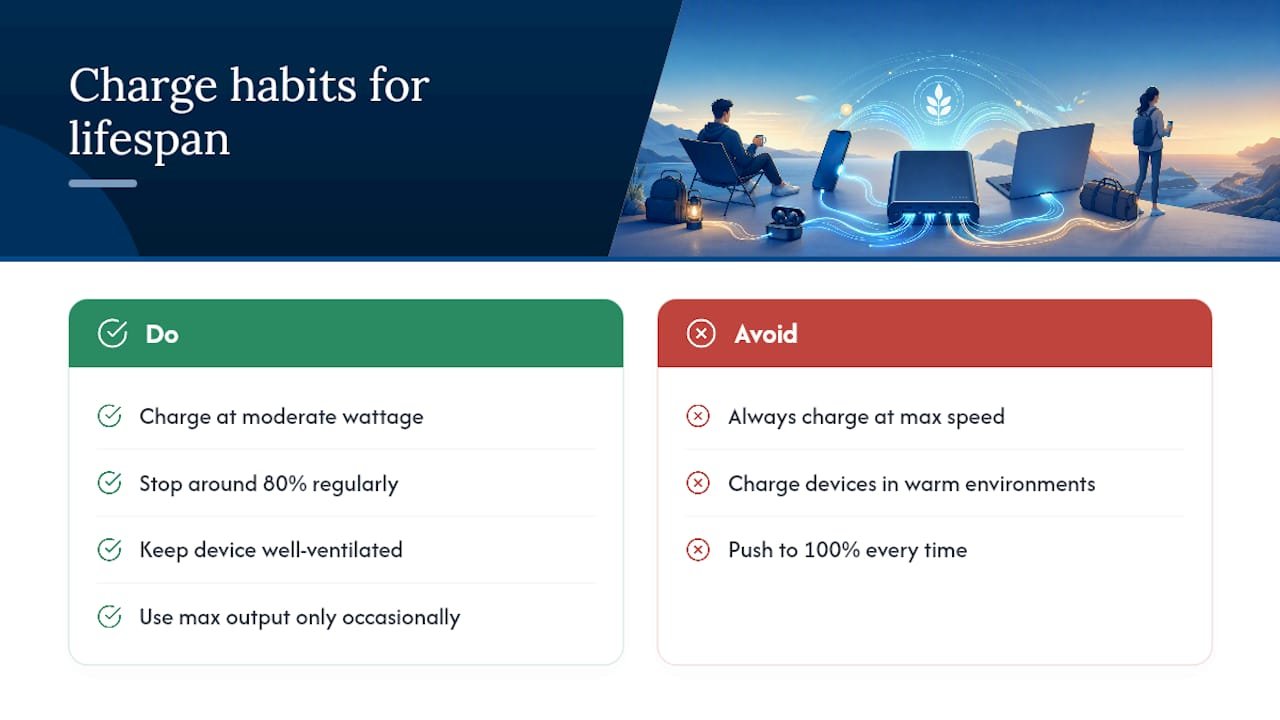
Higher wattage generates more heat, and heat is the primary driver of long-term battery degradation on both sides of the cable. A power bank running at its max output repeatedly, especially in warm environments, accumulates thermal stress on its internal cells faster than one used at moderate loads.
The device being charged faces a similar tradeoff. Lithium-ion and lithium-polymer batteries degrade a little faster when charged at consistently high wattage and high heat compared to slower, cooler charging sessions. This isn’t a reason to avoid fast charging entirely. It’s a reason to treat “always charge at max speed” as a convenience choice, not a default habit.
One practical countermeasure: stopping a charge session around 80% instead of pushing to 100% every time saves meaningful time with minimal practical loss in usable energy, and it reduces the high-voltage tail end of the charge curve that tends to stress cells the most. For both the power bank and the device attached to it, moderate, well-ventilated charging habits extend usable lifespan more than any single spec on the box.
How Does Battery Technology Affect Compatible Max Output?
Not every battery chemistry accepts high wattage the same way. Lithium-ion batteries, the standard in most phones and laptops, tolerate fast charging reasonably well when paired with proper voltage regulation, but they still show faster capacity fade under sustained high-heat fast charging.
Lithium-polymer batteries, common in slimmer phones and some tablets, are more sensitive to heat and tend to benefit from a charging profile that ramps down wattage sooner as the battery approaches full. This is part of why a phone negotiates a lower wattage automatically as it charges. The battery management system inside the device, not the power bank, is making that call based on chemistry and state of charge.
Older devices with legacy USB-A ports or no PD support simply can’t use a high max output bank’s full capability at all. They’ll draw a fixed, lower wattage regardless of what the bank can technically supply, which is worth remembering before assuming a 100W bank will fast-charge an older gadget just because the number looks impressive.
Which Fast Charging Standards Actually Determine Max Output?
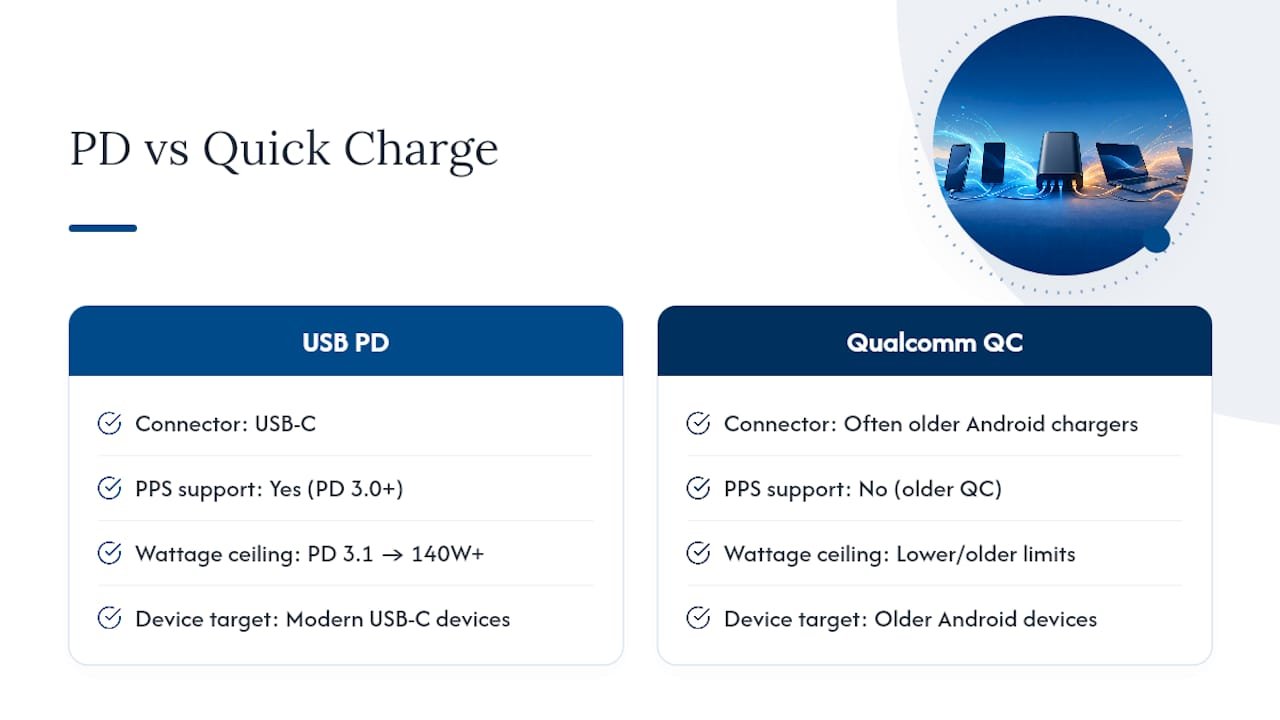
Two standards dominate this space, and knowing the difference prevents a lot of mismatched-cable frustration. USB Power Delivery (PD) is the protocol built for USB-C, and it’s gone through several revisions. PD 3.0 introduced Programmable Power Supply (PPS), which allows finer voltage adjustments in smaller increments rather than jumping between fixed steps. PD 3.1 extended the ceiling further, enabling the 140W and higher single-port ratings now showing up on flagship power banks.
Qualcomm Quick Charge (QC) predates widespread PD adoption and still appears on Android devices and chargers, particularly older ones. QC and PD aren’t fully interchangeable. A device built for QC 3.0 won’t automatically get the same negotiated wattage from a PD-only port, though many modern chargers support both protocols to bridge the gap.
The practical rule: check which protocol your device actually supports before assuming a high max-output bank will charge it quickly. A breakdown of PD versus QC differences is worth a few minutes if you’re mixing older and newer devices in the same household.
What I’d Tell a Friend Buying Their First High-Wattage Power Bank
The biggest mistake buyers make is shopping the headline watt number instead of the per-port rating that actually applies to their device. A cheap, uncertified cable will bottleneck even a well-built 100W bank, so budget for a proper cable as part of the purchase, not an afterthought. Avoid charging in direct heat, and match wattage to your biggest device rather than chasing the highest number on the shelf. Advertised max output tells you what’s possible under perfect conditions. Your actual results depend on the details most listings bury in the fine print.
— Mats
Get a Power Bank Built for Real Max Output, Not Just the Label
This power bank is designed for readers who just learned why a “100W” label doesn’t always mean 100W where it counts. With large capacity, multi-port fast charging, waterproof shell, and a real-time LED display that shows exactly what’s happening during a charge, it aims to hold up to the same port-sharing and heat realities covered above rather than hide from them.

Whether you need a rugged charger for camping trips, a reliable backup for travel days, or a compact option that still hits real wattage numbers, the Ifory power bank lineup covers the range. Check the full specs, compare port ratings against your own devices, and pick the model that matches your highest-draw gadget rather than the biggest number on the box.
Sources
- How to Choose the Perfect Power Bank: A Step-by-Step Guide to mAh, Wattage, and Ports – ChargingGearLab
- How to Charge a Power Bank Faster – PowerBankZone
- Charging time for a power bank: What to expect – Scosche