

A 40,000mAh power bank stores roughly 148Wh, enough for several full phone charges, a few tablet charges and, with the right output, a laptop top-up. At that size it also crosses the 100Wh line that EASA flags for air travel. Our Ifory power bank sits in this class, so we show you how to plan around it.
TL;DR:
- Estimate usable energy after conversion, cable, and heat losses, then divide by your device’s battery capacity in watt hours; lower expectations in cold weather.
- A 100W rating only helps when the device, port, protocol, and cable support that output; multiple connected devices share power and charge more slowly.
- Before flying, check whether your airline requires approval for batteries between 100Wh and 160Wh; carry the bank in hand luggage with protected terminals.
- For trips lasting more than a few days, pair the bank with a 40W solar panel, but allow for conversion losses and weak sunlight.
Table of Contents
- How do you convert mAh to Wh?
- How do you estimate the number of charges?
- Why doesn’t capacity tell the whole story?
- How do you use a 40,000mAh bank outdoors?
- What are the airline rules for a 40,000mAh power bank?
- Author perspective: when is 40,000mAh the right choice?
- A rugged 40,000mAh option built for adventures
- FAQ
- Sources
How do you convert mAh to Wh?
Milliamp-hours tell you only half of the story. To compare batteries honestly, and to know what an airline will say about yours, you need watt-hours. The conversion is short:
- Formula: (mAh × battery voltage) ÷ 1000 = Wh
- Applied to 40,000mAh: this typically stores about 148Wh.
- Where the voltage comes from: use the nominal voltage of the lithium cells inside the power bank to make the conversion.
- What the result means: 148Wh is the total energy the cells hold, before any losses from voltage conversion and heat.
Why bother? A mAh figure only makes sense at a stated voltage. A bank rated in mAh at 3.7V and a device rated in mAh at a different voltage cannot be compared directly, and manufacturers often print the bigger-looking number on the box. Watt-hours remove that ambiguity because energy is energy, no matter what voltage it is delivered at.
Wh is also the figure regulators use. EASA’s guidance on lithium batteries treats a 40,000mAh bank as roughly 148Wh, which is above the 100Wh threshold relevant to airline restrictions. That is why we put the watt-hour figure on how we describe capacity. It is the number a gate agent, a security officer and your own planning spreadsheet all understand.
One practical habit: when you see a power bank listed only in mAh, do the multiplication yourself before you buy. If the label shows both, check that they agree. A mismatch is a reason to look closer at the product.
Keep the 148Wh figure in mind as the ceiling, not the promise. No bank delivers every watt-hour to your device, and the next section shows how to account for that.
How do you estimate the number of charges?
You do not need a lab to estimate how many charges you will get. You need four steps and a calculator, and our three-step runtime estimator walks through the same logic with typical device values.
- Convert the bank to Wh. For 40,000mAh that is 148Wh.
- Apply an efficiency factor. Voltage conversion, cable resistance and heat waste energy. Account for energy lost to voltage conversion, cable resistance and heat, so the usable energy will be less than 148Wh.
- Find the device battery in Wh. It is printed on the battery or in the spec sheet. If only mAh is given, use the formula above.
- Divide usable Wh by device Wh. The result is the number of full charges, before rounding down.
These are estimates, not lab results. Real charging varies with temperature, cable quality, charge speed and how much the device is used while charging. Treat the ranges below as planning tools.
Worked examples by device class
The device capacities below are illustrative values chosen to show the method, not measurements of specific products. Swap in your own device’s Wh for an accurate answer.
Look at what this says. A phone user on a long trip is thinking in weeks, not days. A laptop user gets fewer refills than a phone user, not a week of work. Earbuds and small accessories barely register on the bank, which is why they are the easy win in any packing list.
A few adjustments make the numbers more honest:
- Charging while using the device burns extra energy, so a laptop you are working on drains the bank faster than one that is idle.
- Cold weather reduces what a lithium cell delivers, so lower your efficiency factor for winter trips.
- Slow trickle charging is often more efficient than maximum-speed charging, but it takes longer and may not fit your schedule.
- Older device batteries hold less than their rating, which stretches your count a little.
Pro Tip: Plan with the low end of your range and treat anything extra as a bonus. If you need three phone charges, you want a bank that comfortably delivers five.
For a quick reality check on a laptop, find its charger rating. A charger’s rating does not mean the laptop draws that much power constantly, but it can help you check whether a bank supplies enough power for normal-speed charging. That leads straight to the non-capacity limits in the next section.
Why doesn’t capacity tell the whole story?
Capacity is the size of the fuel tank. Output is how fast the fuel can flow. A big tank with a thin pipe still fills a thirsty device slowly, or not at all.
The two units are easy to confuse, so keep them separate:
- Wh (watt-hours) measures stored energy: how much the bank holds.
- W (watts) measures output power: how fast it can deliver that energy at one moment.
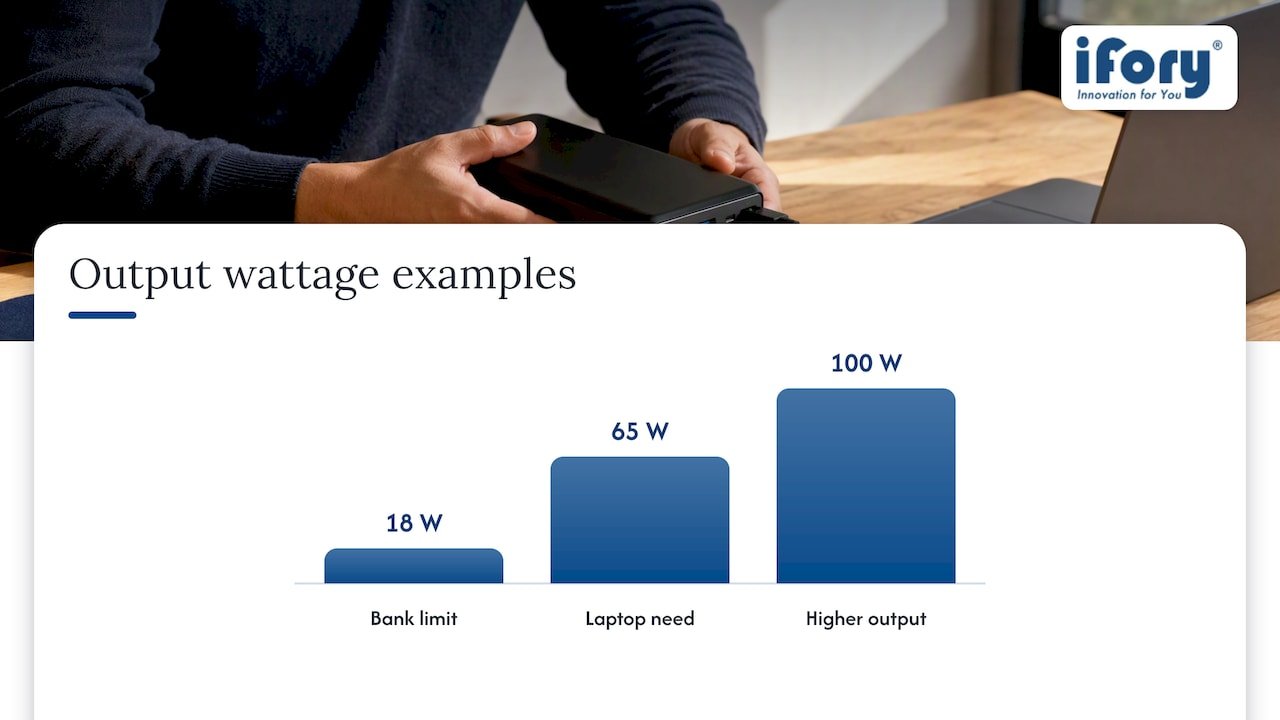
A 148Wh bank limited to 18W can fully charge a phone, but it will never run a laptop that needs 65W, however much energy is inside. Lenovo’s guide to choosing a power bank for a laptop makes the same point: usefulness for fast charging depends on matching the bank’s output wattage and supported protocols to what the device requires.
That is where a 100W output matters. It gives you room to charge higher-wattage devices when the device and cable support it. We explain what that headroom means across phones, tablets and laptops in our guide to power bank max output.
Several constraints decide what you actually get:
- Per-port limits. Each port has its own maximum. A USB-A port is typically much slower than a USB-C port, so the port you pick changes the charging speed more than people expect.
- Shared power. When you plug in several devices, the bank splits its output. Two phones and a camera at once will each charge slower than one device alone.
- Protocol support. USB-C Power Delivery negotiates voltage between bank and device. If either side lacks the protocol the device wants, it falls back to a slower speed.
- Cable ratings. Higher wattage needs a cable built for it. Cables rated for 100W carry an e-marker chip that tells the bank what current is safe. A basic phone cable can quietly cap your speed.
- Heat. Sustained high-power charging warms the bank, and a hot bank may throttle itself.
On cables, length matters too. Longer runs can lose more energy as heat, and we cover cable choices for laptops in our note on USB-C cable length.
If you are charging laptops from a bank for the first time, an outside perspective helps. This Swedish guide to choosing the right USB-C laptop charger explains how to match wattage and connector type to the machine. It is written in Swedish, but the wattage table is easy to follow.
The short version: before you buy or pack, write down the wattage each of your devices needs, then check that the bank’s ports and cables can deliver it. Capacity decides how long you can go on. Output decides whether you can charge at all.
How do you use a 40,000mAh bank outdoors?
Off-grid use is where a large bank earns its weight. The trick is to treat power as a budget for the whole trip, not a per-day top-up.
A typical multi-day setup looks like this: a phone for navigation and photos, a camera, a headlamp or small light, and earbuds. Together, those use only a fraction of the bank each day, so a 148Wh bank covers several days with margin. A bank with a built-in flashlight, like ours, also removes one item from your pack.
For longer trips, add solar. Pairing the bank with a 40W solar panel means the bank is no longer a one-shot battery. In good sun, a PD-capable panel feeds energy back during the day and you charge devices from the bank at night. We stock the Portable Solar Panel next to the Ifory Powerbank, and our guide to USB-C solar charging outdoors covers how to connect the two. Expect to lose some energy in the conversion, so do not plan around ideal conditions.
Protect the bank like the piece of gear it is:
- Heat. Do not leave it on a dark rock or in a closed car. Heat shortens battery life and can trigger protective shutdowns.
- Water and impact. The IP67 rating and anti-drop structure on our bank give a real margin, but a padded sleeve or case still helps against abrasion and sharp knocks.
- Airflow. Keep it uncovered while charging other devices so heat can escape. Never charge it under a sleeping bag or inside a sealed pouch.
- Cold. Keep it in an inside pocket on winter days. A warm battery delivers more.
A simple packing checklist:
- Certified USB-C cables rated for the wattage you need
- A PD-rated solar panel if the trip is longer than a few days
- A protective sleeve or small hard case
- A short cable for the camera and a spare for the phone
- A lightweight spare for any leg of the trip where airline rules limit bank size
Pro Tip: Charge your devices from the bank in the evening, not the morning. A warm, resting battery charges more efficiently, and you start the next day with full devices and a bank you can top up from the panel in daylight.
If shade is your problem, our notes on solar charging in shade cover wiring and tracking tricks that rescue a weak day.
What are the airline rules for a 40,000mAh power bank?
This is the part that surprises people at the airport. At about 148Wh, a 40,000mAh bank is above the 100Wh line, so it falls into a restricted band rather than the “just pack it” category.
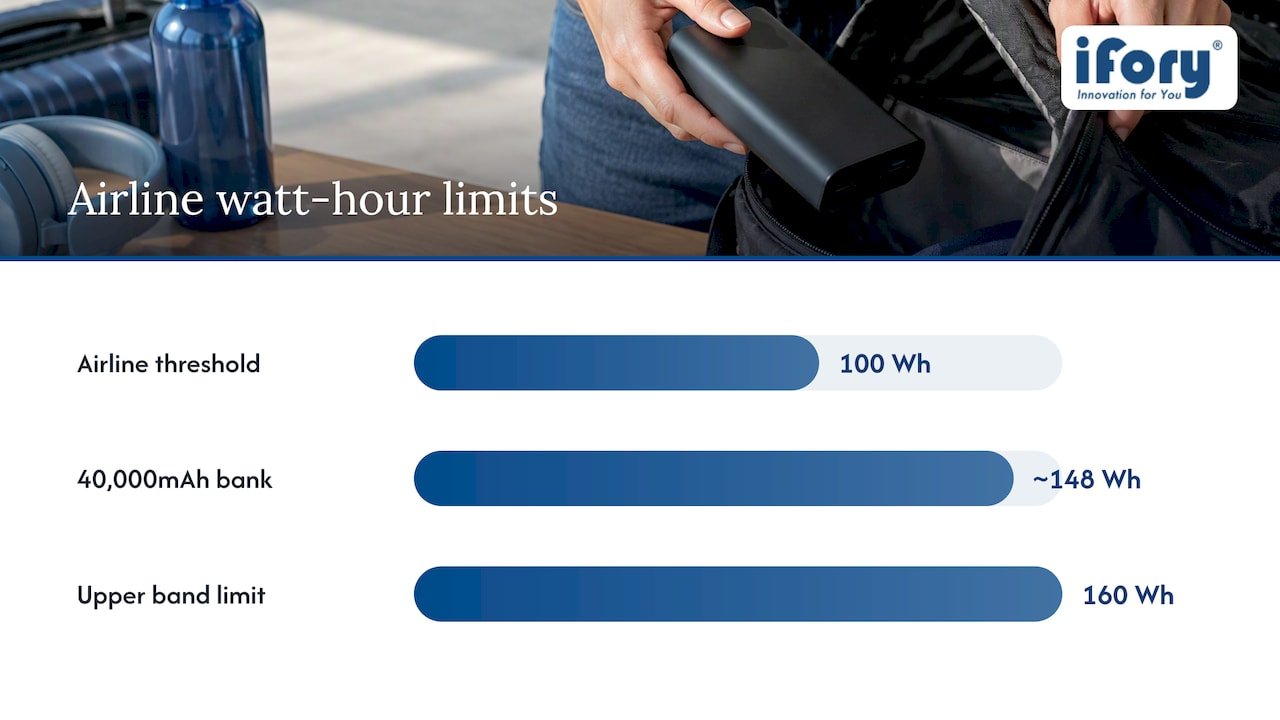
EASA’s recommendations on managing lithium battery risks state that power banks count as spare batteries. They must be carried in hand luggage, protected from short-circuits, and not charged during the flight. Devices above 100Wh may also require operator approval. EASA’s own overview, Lithium Batteries in Aviation, repeats the advice to protect terminals with tape or packaging and to check operator limits for batteries between 100Wh and 160Wh.
Airlines apply these rules in their own way, which is why checking beforehand matters. A quick checklist:
- Check your airline’s policy before you pack. Look for the section on batteries between 100Wh and 160Wh and see whether approval is needed.
- Pack it in your carry-on. Spare lithium batteries do not belong in checked bags.
- Protect the terminals. Use the original packaging, a dedicated pouch, or tape over exposed contacts so nothing can short-circuit.
- Do not charge it in flight. Using the bank to charge a phone is a separate question that varies by airline, so confirm that too.
- Declare it if asked, and keep the Wh figure handy. Printing the label or a screenshot of the spec avoids debates.
- Have a plan B. If an airline refuses it, a smaller bank under 100Wh is the safe backup for that leg.
None of this makes a 40,000mAh bank a bad travel companion. It means a small amount of preparation turns an airport surprise into a routine step.
Author perspective: when is 40,000mAh the right choice?
My view is simple: this capacity is for people who will actually use it. If you spend several days away from a socket, shoot photos or video, or share one power source across a small group, 40,000mAh stops being excess and becomes the thing that keeps the trip running. For a weekend in a city, it is overkill, and you will feel the weight.
The mistake I see most often is buying on capacity alone. A big number with the wrong ports leaves a laptop unpowered while the phone is fine. Match wattage first, capacity second.
For outdoor buyers, the useful features line up neatly: IP67 for rain and spills, a 100W output for laptops and cameras, an LED display so you know what is left, and a built-in flashlight for camp. Before you buy anything, run your own devices through the estimation steps above. A little planning beats a ruined trip.
— Mats
A rugged 40,000mAh option built for adventures
If the numbers above match how you travel, the Ifory Powerbank is suited to it. We give you 40,000mAh of capacity and 100W fast charging, with multiple ports so you can charge a phone, a camera and a light at the same time.
The rest of the design answers the problems the article covered. The waterproof rating and anti-drop structure protect against rain and rough handling, the LED display shows what is left so you can ration it, and the integrated flashlight means one less thing to pack. Together they turn the estimates in this guide into something you can rely on in the field.

See the full range and order at our high capacity power bank page. Choose your setup, add a PD 40W solar panel if your trips run long, and head out with power to spare.
FAQ
How long can a 40,000mAh power bank last?
That depends on what you charge and how fast. In the examples above, a bank this size holds enough energy for several full phone charges and a couple of laptop charges. Use the four-step estimate, plan with the low end of the range, and expect less in cold weather.
What is the difference between watts and mAh for a power bank?
mAh describes how much charge the battery holds, while watts describe how fast the bank can deliver power at a given moment. Converting mAh to watt-hours gives you the real energy figure, and the output wattage tells you whether a device can charge at all. Lenovo’s guidance stresses matching output to the device.
Can I take a 40,000mAh power bank on a plane?
Usually yes, with conditions. At about 148Wh it exceeds the 100Wh threshold, and EASA guidance says spare batteries belong in hand luggage with protected terminals, and that batteries between 100Wh and 160Wh may need operator approval. Check your airline before you fly.
Can a 40,000mAh power bank charge a laptop?
Yes, if its output wattage and protocols match what the laptop needs. A bank with 100W output can power many USB-C laptops, while a low-wattage bank cannot, no matter how large its capacity. Use a certified cable rated for the wattage.