

A MacBook power bank has to match your laptop on USB-C Power Delivery output, and its capacity decides how many charges you get. Roughly 30 to 45W is enough for an Air, and a Pro wants 65W or more. A 20,000mAh bank holds about 74Wh, which is one MacBook Air charge at best. For multi-day trips or a 16-inch Pro, 40,000mAh (148Wh) at 100W is the safer pick.
TL;DR:
- Convert mAh to watt-hours (mAh ÷ 1,000 × 3.7). A 20,000mAh bank is about 74Wh and a 40,000mAh bank is about 148Wh.
- A 20,000mAh bank gives a MacBook Air roughly one full charge and a 14-inch Pro less than one. It will not cover a long working day on the go.
- For an Air, 35W is enough and 70W mainly buys faster charging. A 65W bank is the sweet spot, and it can charge any laptop that accepts USB-C PD, just slowly under heavy load.
- Use a cable rated for the wattage. Anything above 60W needs a 5A e-marked USB-C cable, and a cheap cable will quietly cap your charging speed.
- Anything over 100Wh needs airline approval to fly, so choose a 20,000mAh bank for short flights and a 40,000mAh bank for camping, van life and remote work.
Table of Contents
- MacBook Power Bank Capacity: Can a 20000mAh Bank Charge a MacBook?
- Is 35W or 70W Better for a MacBook Air?
- Can a 65W Power Bank Charge a Laptop?
- The Cable Is Half the Charger
- Flying With a MacBook Power Bank: The 100Wh Line
- Best MacBook Power Bank: My Picks by Use Case
- How to Read a MacBook Power Bank Review Without Getting Fooled
- Get a 100W, 148Wh Power Bank That Keeps a MacBook Running Off-Grid
- Frequently Asked Questions
- Sources
MacBook Power Bank Capacity: Can a 20000mAh Bank Charge a MacBook?
Yes, once. The number printed on the box is in milliamp-hours at the cell's nominal 3.7V, and your MacBook's battery is rated in watt-hours. Convert first: divide the mAh by 1,000 and multiply by 3.7. A 20,000mAh bank holds about 74Wh, and a 40,000mAh bank holds about 148Wh.
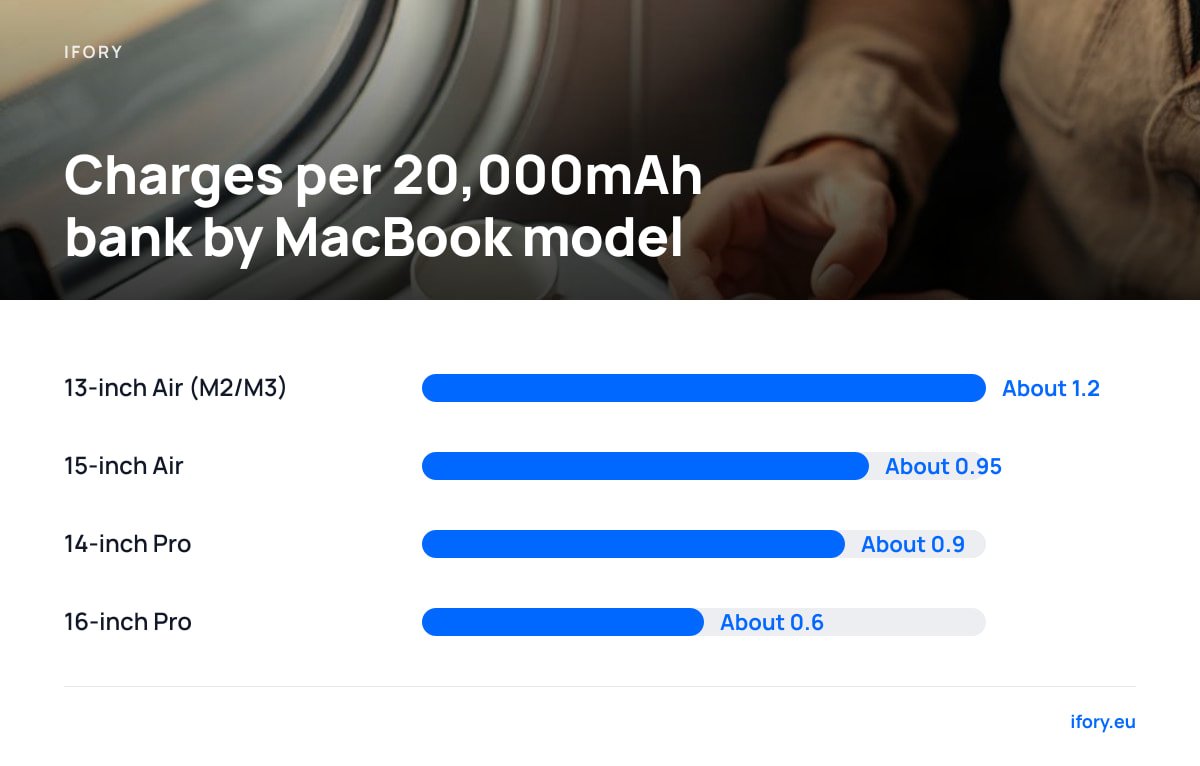
Not all of that energy reaches your laptop. Voltage conversion and cable losses eat into it, and I use 85 percent as a planning figure. Real results shift with temperature, cable quality and whether the Mac is awake and working. With that assumption, here is roughly what you get from a full bank.
| MacBook (approx. battery) | 20,000mAh bank (~63Wh usable) | 40,000mAh bank (~126Wh usable) |
|---|---|---|
| 13-inch Air, M2 or M3 (~52.6Wh) | About 1.2 charges | About 2.4 charges |
| 15-inch Air (~66.5Wh) | About 0.95 charges | About 1.9 charges |
| 14-inch Pro (~70Wh) | About 0.9 charges | About 1.8 charges |
| 16-inch Pro (~100Wh) | About 0.6 charges | About 1.3 charges |
Divide the mAh by 1,000, multiply by 3.7, and you have the watt-hours. 20,000mAh is 74Wh and 40,000mAh is 148Wh.
Those figures assume the Mac is asleep or lightly loaded while it charges. Edit video or compile code on a Pro and a good share of the bank's output goes to running the machine instead of filling the battery. Check your exact model's battery size on Apple's spec page, and see our MacBook charging guide for model-by-model adapter details.
Is 35W or 70W Better for a MacBook Air?
Buy a bank that delivers at least 45W, and ideally 65W. Apple's guidance on power adapters says a lower-wattage adapter will still work with a Mac notebook, just more slowly. An Air at light load sips well under 30W, so 35W fills a 52.6Wh battery in about two hours.
- Where 35W wins. Lighter, cheaper banks and no wasted headroom. If you write, browse and run video calls, you will not feel the difference.
- Where 70W wins. Apple ties its fast-charge claims for some Air models to the larger adapter, and a 70W source also keeps the battery rising while you render, export or run a heavy browser session.
- Where neither matters. The laptop sets the ceiling. A 100W bank does not push 100W into an Air, because USB-C Power Delivery negotiates and the Air asks only for what it can take.
Watch the multiport split. A bank advertised at 100W usually shares that total across its ports, so plugging in a phone can drop the laptop port from 100W to 65W or less. Check the per-port table on the spec sheet, including ours. Ignore Quick Charge badges on the box. MacBooks charge over Power Delivery, and our Quick Charge explainer covers where the two protocols part ways.
Can a 65W Power Bank Charge a Laptop?
Yes, any laptop that accepts USB-C charging will take it, provided the bank speaks USB Power Delivery. The USB Implementers Forum maintains the Power Delivery specification, which has the bank and the laptop agree on a voltage and current before any real power flows. A 65W bank negotiates something like 20V at 3.25A.
Charging speed varies by laptop:
- Air and other thin laptops. A 65W bank charges them comfortably, even while you work.
- 14-inch Pro. It works, though a heavy workload can draw more than the bank supplies, and the battery percentage will stall or creep downward.
- 16-inch Pro. Apple's own adapter for it is much larger. A 65W bank will keep it alive through light work and charge it slowly when it is idle.
If a laptop shows "Not Charging" on a 65W bank, the usual culprit is the cable or a protocol mismatch, not the wattage.
The Cable Is Half the Charger

USB-C cables carry 3A at 20V (60W) by default. Anything above that needs a cable with an electronic marker chip that declares 5A support, which is what makes 100W charging legal under the spec. Plug a 100W bank into a laptop with a bare 60W cable and the system silently falls back to 60W or less.
Use the cable that came with your laptop, or buy one clearly labeled 100W and 5A. A cheap phone cable is the most common reason a "65W power bank" charges a laptop at a trickle.
Pro Tip: Verify what your Mac is really receiving. Hold Option, click the Apple menu, open System Information, and select Power. Under AC Charger Information, the Wattage line shows the negotiated power. If it reads 30W on a bank that claims 65W, swap the cable before you blame the bank.
Flying With a MacBook Power Bank: The 100Wh Line
Airlines count watt-hours, not mAh. The FAA's PackSafe guidance allows spare lithium-ion batteries up to 100Wh in carry-on without special approval. Batteries between 100Wh and 160Wh need airline approval, with a limit of two per passenger, and none of them go in checked bags. IATA's lithium battery guidance sets the same thresholds for carriers worldwide.
20,000mAh is 74Wh and walks through security without a form. 40,000mAh is 148Wh and needs an airline to say yes first.
For a weekend flight with a MacBook Air, a 20,000mAh bank is the efficient pick. If you are heading off-grid for days, 148Wh is worth the paperwork, and our guide to flying with a 40,000mAh power bank walks through the approval step.
Best MacBook Power Bank: My Picks by Use Case
No single bank is best, because the right one depends on your laptop and how far from a wall socket you plan to be. Here is where I land.
- MacBook Air, flights and cafes. A 20,000mAh bank with a 45 to 65W USB-C port. It stays under the 100Wh line and recharges an Air once.
- 14-inch Pro, daily commuting. 65W or more, and expect less than a full charge from 20,000mAh. Go to 100W if you work while charging.
- 16-inch Pro or multi-device carry. 100W with 40,000mAh. It still will not match a 140W wall adapter at peak load, but it comes closest of anything you can carry.
- Camping, van life, remote work. 40,000mAh with a solar input path. Capacity is what you run out of first out there.
Our look at the best power bank for Steam Deck covers the same Wh math for handhelds.
How to Read a MacBook Power Bank Review Without Getting Fooled
Most reviews test a bank with a phone, and a phone test tells you nothing about a laptop. Look for these specifics.
- A sustained load test. Did the reviewer run the bank at its rated wattage for more than a few minutes? Many banks throttle when they get warm.
- The per-port split. Reviews that skip multiport behavior skip the thing that bites you.
- Watt-hours delivered. A reviewer who measures energy out, not just energy in, has actually tested capacity.
- The cable used. A great result with a 5A cable says nothing about your own cable.
Be wary of any review that never states the laptop model, since a bank that is fine for an Air can be a bad match for a 16-inch Pro.
Get a 100W, 148Wh Power Bank That Keeps a MacBook Running Off-Grid
Most banks either feed a laptop or hold real energy, and few do both. Ifory built its 40,000mAh, 100W power bank for that job: 148Wh holds about two and a half MacBook Air charges or one and a third of a 16-inch Pro, and the 100W USB-C port covers every Air and 14-inch Pro. For recharging with no outlet, the 40W Portable Solar Panel (PD, 21.88V/2.19A) pairs with it. Plan on a full day of good sun to refill the bank, and see our USB-C solar charger guide for what wattage really delivers outdoors. The bank-and-panel bundle currently includes the panel free, shipping is free, and returns run 30 days. Check the product page for today's price.
The limits: 148Wh is over the 100Wh airline line, so you need approval before you fly with it. And 100W will not match the 140W a 16-inch Pro can pull flat out, so heavy rendering will drain it slowly even while plugged in. Read the per-port output table on our spec sheet like any other.
Frequently Asked Questions
Can a 20000mAh power bank charge a MacBook?
Yes, as long as it has a USB-C Power Delivery port rated for your laptop. A 20,000mAh bank holds about 74Wh, which is roughly one full charge for a 13-inch MacBook Air and less than one for any Pro.
Is 35W or 70W better for a MacBook Air?
A 35W source is enough for light work and fills an Air in about two hours. A 70W source charges faster and keeps up while you run heavy tasks, but the Air only draws what it needs, so a bank above 65W adds little.
Can a 65W power bank charge a laptop?
Yes, any laptop that accepts USB-C Power Delivery will charge from it. A thin laptop charges comfortably, while a 14-inch or 16-inch Pro charges slowly or holds steady under heavy workloads.
What is the best power bank for a MacBook?
It depends on the model and the trip. A 20,000mAh bank at 45 to 65W suits an Air and carry-on flights, while a 40,000mAh bank at 100W suits Pros and multi-day off-grid use.
Why does my MacBook say it is not charging on a power bank?
The cable is the usual cause, especially if it is not rated for the wattage. Open System Information, select Power, and check the Wattage under AC Charger Information to see what the bank is actually delivering.
Sources
- Use the right power adapter and cable for your Mac notebook | Apple Support
- USB Power Delivery | USB Implementers Forum
- Lithium Batteries (PackSafe) | Federal Aviation Administration
- Lithium Battery Guidance | International Air Transport Association