

The best power bank for Steam Deck delivers at least 45W over a single USB-C Power Delivery port and holds 60Wh or more, which in practice means 20,000mAh at the minimum. Watt-hours decide it. A 10,000mAh bank gives you about half a charge, while a 40,000mAh bank gives you two or more. If a laptop is also in your bag, a 100W model is the better buy.
TL;DR:
- Steam Deck ships with a 45W charger. You need a power bank with a USB-C PD port rated 45W or higher, and a 100W port will not charge the Deck any faster.
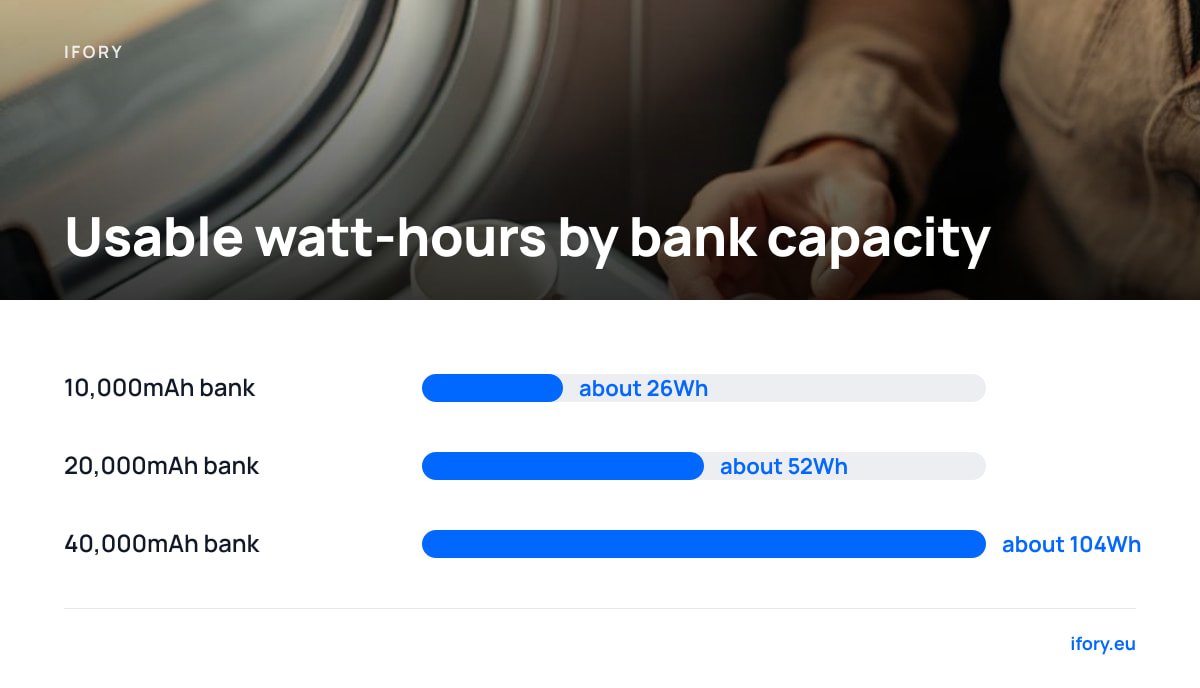
- Convert mAh to watt-hours (mAh x 3.7 / 1000), then take about 70% as usable. A 10,000mAh bank gives roughly 26Wh, which is half a charge for the Deck's 50Wh OLED battery.
- 20,000mAh suits day trips (about one full charge). 40,000mAh suits weekends, flights and sharing power with a laptop.
- Read the spec sheet, not the logo: single-port wattage, honest Wh, UN 38.3 testing and a cable rated for the load matter more than any brand.
- Anything over 100Wh, including every 40,000mAh bank, needs airline approval in carry-on, so check before you fly.
Table of Contents
- What Watt Charger Does a Steam Deck Need, and Why 100W Won't Charge It Faster
- Best Power Bank for Steam Deck by Capacity: 10,000 vs 20,000 vs 40,000mAh
- How to Read a Power Bank Label Before You Buy
- Best Power Bank for Steam Deck on Reddit and Amazon: What to Trust and What to Check
- Which Brand of Power Bank Is Considered the Best?
- What Power Bank Do You Need for a Laptop Alongside Your Deck?
- Flying, Cables and Heat: Where Handheld Setups Go Wrong
- Get a 100W Power Bank That Gives Your Steam Deck Two-Plus Charges
- Frequently Asked Questions
- Sources
What Watt Charger Does a Steam Deck Need, and Why 100W Won't Charge It Faster
Valve ships the Steam Deck with a 45W USB-C charger, so 45W is the number to match. Any USB-C Power Delivery port rated 45W or higher will charge it at full speed, because the Deck asks for only the power it can accept.
Plugging a Steam Deck into a 100W port charges it about as fast as a 45W port. The extra watts only matter when something else shares the bank.
Lower-wattage ports work, but they are slower. Valve's published specs list a 40Wh battery on the LCD model and quote two to eight hours of play on it. That works out to a draw of roughly 5W to 20W depending on the game. A 30W port charges the Deck while you play in most titles, just slowly. A 15W or 18W port can lose ground in demanding games, so the percentage creeps down even while plugged in.
If your travel kit also includes a Switch, the same wattage logic applies at a smaller scale. Our guide to charging a Nintendo Switch on the go covers it.
Best Power Bank for Steam Deck by Capacity: 10,000 vs 20,000 vs 40,000mAh
Which is better, 10,000mAh or 20,000mAh? For a Steam Deck, 20,000mAh, and it isn't close. The mAh figure on the box is measured at the cell voltage of about 3.7V, so convert to watt-hours first (mAh x 3.7 / 1000). Then count on roughly 70% of that reaching your device, since voltage conversion and cable losses eat the rest. That 70% is a rule of thumb, and good banks can do better.
| Bank size | Nominal Wh | Usable Wh (about 70%) | Charges for Deck LCD (40Wh) | Charges for Deck OLED (50Wh) |
|---|---|---|---|---|
| 10,000mAh | 37Wh | about 26Wh | about 0.65 | about 0.5 |
| 20,000mAh | 74Wh | about 52Wh | about 1.3 | about 1 |
| 40,000mAh | 148Wh | about 104Wh | about 2.6 | about 2 |
Here is how I would pick:
- 10,000mAh. Skip it for the Deck. It works as an emergency top-up of an hour or two of gameplay, and its USB-C port is often limited to 20W to 30W. It's a fine phone bank and a poor handheld PC bank.
- 20,000mAh. The right buy for commutes, day trips and one-night stays. It gives you one full charge, or an extra three to five hours of play depending on the game. Expect a weight of around 350g to 450g.
- 40,000mAh. Buy this for weekends away, long-haul travel, camping, or any trip where the Deck shares the bank with a phone and a laptop. It is heavier (typically 700g and up), but two to three Deck charges is hard to beat.
The Power Bank Review Guide goes deeper on how capacity, output and weight trade off across all device types.
How to Read a Power Bank Label Before You Buy
Most bad purchases come from reading the wrong number. Five lines on the spec sheet tell you almost everything:
- Watt-hours. If the listing shows only mAh, calculate Wh yourself. A bank that lists Wh as well usually comes from a maker confident in its numbers.
- Single-port output. Look for "USB-C PD 45W" or higher on one port. A "65W total" bank that splits power across three ports may give the Deck only 20W.
- Output when ports are shared. Plug in a Deck and a laptop together and the bank divides its output. A 100W bank powering a 65W laptop leaves about 35W for the Deck, which is still enough to hold its charge in most games.
- Cable rating. USB-IF's Power Delivery specification requires an electronically marked cable to carry more than 3A, which is the 60W limit. A 45W Deck charge works on a basic 3A USB-C cable. A 100W laptop charge needs a 5A e-marked cable.
- Pass-through charging. Check that the bank can charge itself and power the Deck at the same time. Most good ones can, though some get warm doing it.
Best Power Bank for Steam Deck on Reddit and Amazon: What to Trust and What to Check
Reddit threads and Amazon listings are where most buyers start, and both have predictable traps.
On Reddit, check the post date and the Deck model. Many recommendations date from the LCD era, when the battery was 40Wh and the screen drew less. An answer that said "20,000mAh is plenty" in 2022 reads differently for a 50Wh OLED owner. Watch for single anecdotes ("works fine for me") with no wattage or game named. Prefer comments that state the wattage shown on the Deck's screen while charging.
On Amazon, a few things catch people out:
- Inflated mAh. Some listings quote capacity at 5V output, which flatters the number. If the title promises 20,000mAh but the weight is closer to a 10,000mAh bank, the cells are probably smaller than advertised.
- Total versus per-port wattage. "100W" in the title often refers to all ports combined, or to a mode the bank only reaches briefly.
- Review sorting. Sort by most recent and read the three-star reviews. They tend to mention a bank that cuts out at 30W or runs too hot to hold.
Which Brand of Power Bank Is Considered the Best?
No single brand wins every category, and I won't hand you a logo to trust. Brand reputation is a shortcut, but a spec sheet and testing record are better evidence, and you can check them. These are the markers to look for, in order:
- A real 45W+ PD port. The single-port figure matters more than the headline number.
- Disclosed Wh. If a maker publishes watt-hours, you can verify the claim with the 3.7V conversion above.
- UN 38.3 test summary. This is the UN transport test for lithium batteries, and reputable sellers can produce it on request.
- CE marking and a named EU seller. In Europe, returns and warranty claims then go to a real address.
- Return window. A 30-day return period lets you test it with your own Deck.
What Power Bank Do You Need for a Laptop Alongside Your Deck?
Match the bank's output to your laptop charger's wattage, and check that the capacity covers at least one full charge of its battery. A thin 13-inch ultrabook usually ships with a 45W to 65W charger. A 14-inch or 16-inch performance machine often uses 65W to 100W.
A 65W USB-C PD port runs most ultrabooks and a Deck. A 100W port suits larger laptops that draw more under load. On capacity, a laptop with a 55Wh battery needs about 80Wh of bank for one full charge. A 20,000mAh bank (about 52Wh usable) therefore gives a partial top-up, while a 40,000mAh bank gives a full one with Deck power to spare.
Sharing has a cost. A Deck at 45W plus a laptop at 65W asks for 110W, which no 100W bank can deliver at once, so both slow down a little. For MacBook owners, our MacBook charging guide lists the wattage each model actually accepts.
Flying, Cables and Heat: Where Handheld Setups Go Wrong

The airline rule catches more travelers than any spec. The FAA's PackSafe guidance says spare lithium batteries must travel in carry-on bags, and batteries between 101Wh and 160Wh need airline approval, with a limit of two per passenger. A 40,000mAh bank is roughly 148Wh, so it sits in the approval band. Our 40,000mAh power bank on a plane guide explains how to handle it at the check-in desk. A 20,000mAh bank at about 74Wh needs no approval.
Two smaller issues cause most day-to-day grief:
- Cable quality. A cheap or frayed cable can limit the Deck to 15W without any warning. If the Deck shows a slow-charge message, swap the cable before blaming the bank.
- Heat. Charging and gaming together warms the Deck, and a bank wedged in a bag with no airflow warms too. Keep both out of direct sun and loose enough to breathe.
Pro Tip: Stretch a 20,000mAh bank by lowering the Deck's draw instead of buying more battery. In the Deck's performance overlay, cap the frame rate at 40 and set the TDP limit to 8W to 10W for lighter games. Because the Deck runs on roughly 5W to 20W, trimming even 4W off a 12W average adds about a third more play time from the same bank.
Get a 100W Power Bank That Gives Your Steam Deck Two-Plus Charges
The bank has to hold enough watt-hours for several sessions, and it needs a port that can drive both a 45W Deck and a laptop. The Ifory 40000mAh 100W Power Bank was built for that job. Its 148Wh of nominal capacity gives about 104Wh usable, which is two to three Deck charges. The 100W output covers a 14-inch or 16-inch laptop, and it was designed to be rugged for camping, climbing and travel. Free shipping and a 30-day return window mean you can test it with your own Deck before committing. Check the current price on the product page.
The caveats are size and flights. At 148Wh, it needs airline approval in carry-on, and it is heavier than a 20,000mAh bank, so for a short commute a smaller unit is the better pick. When you're off-grid for days, the optional 40W portable solar panel (PD, 21.88V/2.19A) can recharge it, though real output in partial sun will land below the rating. A bundle with a free solar panel is available, and our USB-C solar charger guide explains what to expect outdoors.
Frequently Asked Questions
What watt charger does a Steam Deck need?
The Steam Deck ships with a 45W USB-C charger, so a 45W USB-C Power Delivery source is the right match. Lower-wattage chargers work but charge slowly, and 15W to 18W units can lose ground while you play demanding games. A higher-wattage port such as 100W is safe and will not make the Deck charge noticeably faster.
What power bank do I need for a laptop?
Choose a bank whose USB-C PD output matches your laptop charger's wattage, usually 45W to 65W for ultrabooks and up to 100W for larger machines. For a full charge, the bank's usable watt-hours (about 70% of mAh x 3.7 / 1000) should exceed the laptop's battery capacity. A 100W, 40,000mAh bank covers most laptops.
Which power bank is better, 10,000mAh or 20,000mAh?
For a Steam Deck, 20,000mAh. A 10,000mAh bank holds about 37Wh, which delivers roughly 26Wh after conversion losses, or about half of a Deck OLED charge. A 20,000mAh bank gives roughly one full charge and usually has a faster USB-C port.
Which brand of power bank is considered the best?
No single brand is best across every use. Pick by spec: a single USB-C PD port rated 45W or higher, disclosed watt-hours, UN 38.3 test documentation, CE marking and a fair return window. Those criteria separate good banks from risky ones better than a logo does.
Can I play my Steam Deck while it charges from a power bank?
Yes, as long as the bank supports a 45W USB-C PD port. The Deck draws roughly 5W to 20W while playing, and the rest of the 45W goes into the battery. For the fastest charge, put the Deck to sleep while it tops up.
Sources
- Steam Deck Tech Specs | Valve
- USB Power Delivery | USB Implementers Forum
- Lithium Batteries (PackSafe) | Federal Aviation Administration