

Charging a MacBook takes a USB-C cable and a USB Power Delivery charger, and wattage decides how well it works. The adapter that shipped with your Mac, or one close to its rating, charges at full speed. A phone charger works too, but slowly, and under heavy load your battery can still drain while plugged in.
TL;DR:
- Match wattage to your model: about 30W for a MacBook Air, 67W to 96W for a 14-inch Pro, 140W for a 16-inch Pro. Lower-wattage chargers work but charge slower.
- A phone charger will charge a MacBook, but a 20W unit can take 3 hours or more to fill an Air and may not keep up with a heavy workload.
- In the menu bar, a lightning bolt means charging and a plug means connected but not charging. On MagSafe models, amber means charging and green means full.
- If a MacBook shows charging but won't turn on, wait 10 to 30 minutes on a known-good charger, then hold the power button for 10 seconds.
- A 40,000mAh power bank holds roughly 148Wh, enough for about 2 Air charges or 1.8 14-inch Pro charges, and needs airline approval to fly.
Table of Contents
- Charging a MacBook the Right Way: Wattage, Ports and Cables
- How Do You Know Your MacBook Is Charging? Icons, LEDs and Odd Cases
- Can You Use a MacBook While Charging? Yes, With One Catch
- Can I Charge a MacBook Pro With a Phone Charger?
- MacBook Won't Turn On but Is Charging: A Fix Order That Works
- How Long Should a MacBook Pro Last? Battery Cycles vs. Whole-Machine Years
- Charging a MacBook Away From an Outlet: What a Power Bank Delivers
- Get a 100W Power Bank That Keeps Your MacBook Alive Off-Grid
- Frequently Asked Questions
- Sources
Charging a MacBook the Right Way: Wattage, Ports and Cables
Every current MacBook charges over USB-C, and the 14-inch and 16-inch Pro models also have a MagSafe 3 port. The charging standard underneath is USB Power Delivery, which negotiates voltage between charger and laptop. That is why a third-party USB-C charger works fine: the two devices agree on a power level and the laptop pulls what it needs, up to what the charger can supply.
Apple's support documentation says you can use a lower-wattage adapter than the one that shipped with your Mac, and it will charge more slowly. Here is how I would match them in practice:
| Model | Battery (approx.) | Adapter in the box | Lowest charger I'd use daily |
|---|---|---|---|
| MacBook Air 13-inch | 50 to 53Wh | 30W to 35W (varies by configuration) | 30W |
| MacBook Pro 14-inch | 70Wh | 67W to 96W (varies by chip) | 65W |
| MacBook Pro 16-inch | 100Wh | 140W | 100W |
The 16-inch Pro is the one that punishes underpowered chargers. At 100W it still charges, but if you render video or compile code at full tilt, it can pull more than the charger supplies and the battery will slowly dip.
Pro Tip: Check the cable before you blame the charger. USB-C cables without an e-marker chip are limited to 3 amps, which caps them at 60W at 20 volts. A MacBook Pro on a cheap charging cable will quietly charge at 60W no matter how strong the wall brick is. Look for a cable rated 100W or 5A, and use the braided one that came with your Mac when in doubt.
How Do You Know Your MacBook Is Charging? Icons, LEDs and Odd Cases
You have three signals to read, and they can disagree with each other.
- Menu bar icon. A battery with a lightning bolt means charging. A battery with a plug means the Mac is on power but not charging, which is normal when the battery is full or when macOS is holding it at 80% under Optimized Battery Charging.
- MagSafe LED. On MagSafe 3 models, amber means charging and green means fully charged. If the light stays off, reseat the cable and try another outlet.
- USB-C models. The Air has no light, so check the menu bar or click the battery icon. It states "Power Source: Power Adapter" and shows whether the battery is charging.
One case catches people out: a Mac can show "Not Charging" at 80% for hours. That is Optimized Battery Charging working as designed. Apple's battery guidance describes it as a way to slow chemical aging by limiting time spent at full charge.
Can You Use a MacBook While Charging? Yes, With One Catch
Yes. Plugged in, the Mac runs from the adapter and tops up the battery with whatever power is left over. Gaming, video editing and 4K exports are fine on a charger that matches your model.
The catch is power budget. If the charger delivers 30W and the Mac is drawing 45W under load, the battery supplies the 15W gap and drains even though you are plugged in. That is the typical failure with undersized chargers and 60W cables. The symptom is a battery percentage that falls slowly while the plug icon is showing.
Heat is a second problem. Charging and heavy load together warm the chassis, and sustained warmth ages lithium cells faster. If you work plugged in for days at a stretch, leave Optimized Battery Charging on.
Can I Charge a MacBook Pro With a Phone Charger?
You can, if the phone charger has a USB-C port and supports USB Power Delivery. A plain USB-A brick will not do it, and neither will a charger limited to 5V.
A 20W phone charger on a 13-inch Air with a roughly 52Wh battery needs about 2.5 to 3 hours to fill it from empty, and that assumes the Mac is mostly idle. On a 14-inch Pro, a 20W charger barely outpaces the Mac's own idle draw with the screen on. On a 16-inch Pro, treat it as an emergency trickle.
My take: a phone charger is fine for topping up an Air during a meeting, and a bad plan for any Pro you actually use. A 65W USB-C charger costs little, weighs about as much as a phone, and covers the Air and the 14-inch Pro for travel. If you plan to charge from a battery pack instead of a wall, our guide on whether a power bank can charge a MacBook Pro covers the details.
MacBook Won't Turn On but Is Charging: A Fix Order That Works
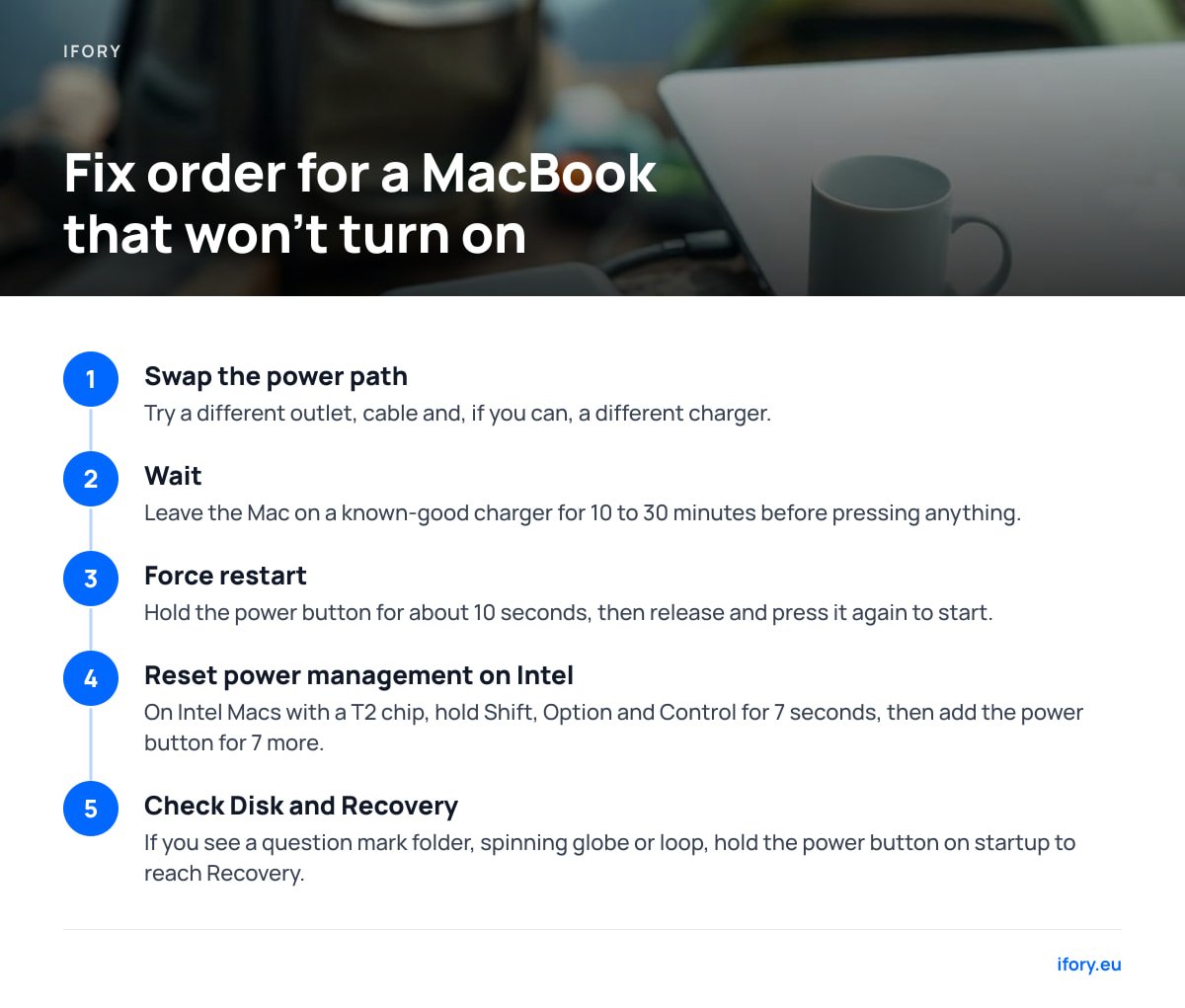
Work through this in order, because the early steps are the cheap ones.
- Swap the power path. Try a different outlet, a different cable, and if you can, a different charger. A bad cable accounts for a large share of "charging but dead" reports.
- Wait. A fully drained battery needs time. Leave the Mac on a known-good charger for 10 to 30 minutes before pressing anything. The "stuck on charging screen" situation often resolves itself once enough charge has built up.
- Force restart. Hold the power button (the Touch ID button) for about 10 seconds, until the screen goes dark or startup options appear, then release and press it again to start.
- Reset power management on Intel Macs. On Intel models with a T2 chip, shut down, then hold right Shift, left Option and left Control for 7 seconds, keep holding as you add the power button for 7 more, then release and start up. Apple silicon Macs have no separate reset, since a restart does the job.
- Check Disk and Recovery. If you see a folder with a question mark, a spinning globe or a loop, the problem is software or storage, not the charger. Hold the power button on startup to reach Recovery.
If none of this brings the screen to life, book a diagnostic with Apple or an authorized repair shop. A swollen battery, which can show up as a lifted trackpad or a case that no longer sits flat, is a reason to stop charging and get it looked at immediately.
How Long Should a MacBook Pro Last? Battery Cycles vs. Whole-Machine Years
Your laptop has two lifespans. The battery is rated by cycles. Apple states that current Mac notebook batteries are designed to retain up to 80% of their original capacity at 1,000 complete charge cycles.
1,000 cycles to 80% capacity is Apple's design target for current MacBook batteries, and a cycle counts as 100% of capacity used in total, not one plug-in.
Charging from 50% to 100% twice adds up to one cycle. So a person who plugs in daily and only uses half the battery adds a cycle every two days, which is roughly 4 to 5 years to reach 1,000 under that pattern. Heavy users who drain fully each day reach it in under three years.
The machine itself commonly outlasts the battery. Apple silicon MacBooks usually stay usable for 6 to 8 years in my experience, and a mid-life battery replacement is cheaper than a new laptop. Habits that help: avoid leaving the Mac at 100% on a hot desk for weeks, keep Optimized Battery Charging on, and don't store a Mac fully drained for months.
Charging a MacBook Away From an Outlet: What a Power Bank Delivers

A power bank only works for a laptop if it supports USB Power Delivery at laptop wattage, and the mAh figure printed on it is misleading. Convert it. A 40,000mAh pack at a 3.7V nominal rating holds about 148Wh, and after conversion losses of 15% or so, roughly 125Wh reaches the laptop.
| MacBook | Battery | Full charges from 125Wh (estimate) |
|---|---|---|
| Air 13-inch | ~52Wh | about 2.4 |
| Pro 14-inch | 70Wh | about 1.8 |
| Pro 16-inch | 100Wh | about 1.25 |
Flying adds limits. The FAA's PackSafe guidance allows spare lithium batteries up to 100Wh in carry-on without approval, and 101 to 160Wh only with airline approval, with a limit of two per passenger.
At roughly 148Wh, a 40,000mAh power bank sits above the 100Wh line and below the 160Wh ceiling, which means it flies only with airline approval.
For wattage, flight rules and recalls in detail, see our laptop power bank guide. If you want to go fully off-grid, the solar charging guide shows what a panel produces in real sun, which is usually well under its rating.
Get a 100W Power Bank That Keeps Your MacBook Alive Off-Grid
A MacBook wants 30W to 100W, and a normal power bank gives it a trickle or nothing. The Ifory 40000mAh 100W Power Bank negotiates USB Power Delivery at up to 100W, so an Air or 14-inch Pro charges at close to wall speed while you work from a campsite, train or ferry. At about 148Wh it gives you two Air charges in a bag built for rain and drops, and it comes with free shipping and a 30-day return window. For longer trips, pair it with the 40W portable solar panel (PD, 21.88V/2.19A), which is also available as a bundle with a free-panel promotion. Check the product page for the current price.
The limits: 100W is the ceiling, so a 16-inch Pro under a heavy render can still draw down slowly, and you need a 100W-rated cable to reach full speed. At 148Wh it also needs airline approval, so check your carrier's rules and our spec sheet before you fly. Solar will deliver far less than 40W in typical conditions, so use it as a top-up, not a primary source.
Frequently Asked Questions
Can I charge my MacBook Pro with a phone charger?
Yes, if the phone charger has a USB-C port and supports USB Power Delivery. A 20W unit will charge an Air slowly and can't keep up with a 14-inch or 16-inch Pro under load. For regular use, a 65W USB-C charger is the better match.
How long should a MacBook Pro last?
Apple designs current Mac notebook batteries to hold up to 80% of capacity at 1,000 charge cycles, which is about 3 to 5 years of typical daily use. The laptop itself often stays useful for 6 to 8 years, especially if you replace the battery once.
How do I force restart my MacBook?
Hold the power button (Touch ID button) for about 10 seconds until the screen goes dark or startup options appear, then release it and press it again. On Intel Macs with a T2 chip, a power management reset adds a Shift, Option and Control key combination held for 7 seconds before the power button.
Can you use a MacBook when charging?
Yes, and it is safe. The Mac runs from the adapter and sends leftover power to the battery. If the charger is underpowered for what you are doing, the battery will still drain slowly even while plugged in.
How do I know if my MacBook is charging?
Look at the menu bar: a lightning bolt on the battery icon means charging, and a plug means connected but not charging. On MagSafe models the port light is amber while charging and green when full.
Sources
- Apple Support: Mac notebook power adapters and charging | Apple
- Apple batteries: Maximizing battery performance and lifespan | Apple
- USB Power Delivery overview | USB Implementers Forum
- PackSafe: Batteries and portable chargers | Federal Aviation Administration